How To Open A New Account With SABB Bank Online
How to Open an Account with SABB Bank Online: Saudi British Bank Online e-Account Opening, Eligibility Requirements.
The Saudi British Bank (SABB) is one of the five largest banks in Saudi Arabia in terms of deposits. The SABB bank has over eighty branches across the kingdom. The following is a step-by-step guide on how to open a new account with SABB Bank online.
Requirements for opening an account with Saudi British Bank
- You must be at least 18 years old.
- A Valid Iqama
- Registration of Absher
- Registration of National Addresses
SABB Bank Online e-Account Opening
Visit the SABB Bank’s online account opening page: https://eform.sabb.com/eao/#/
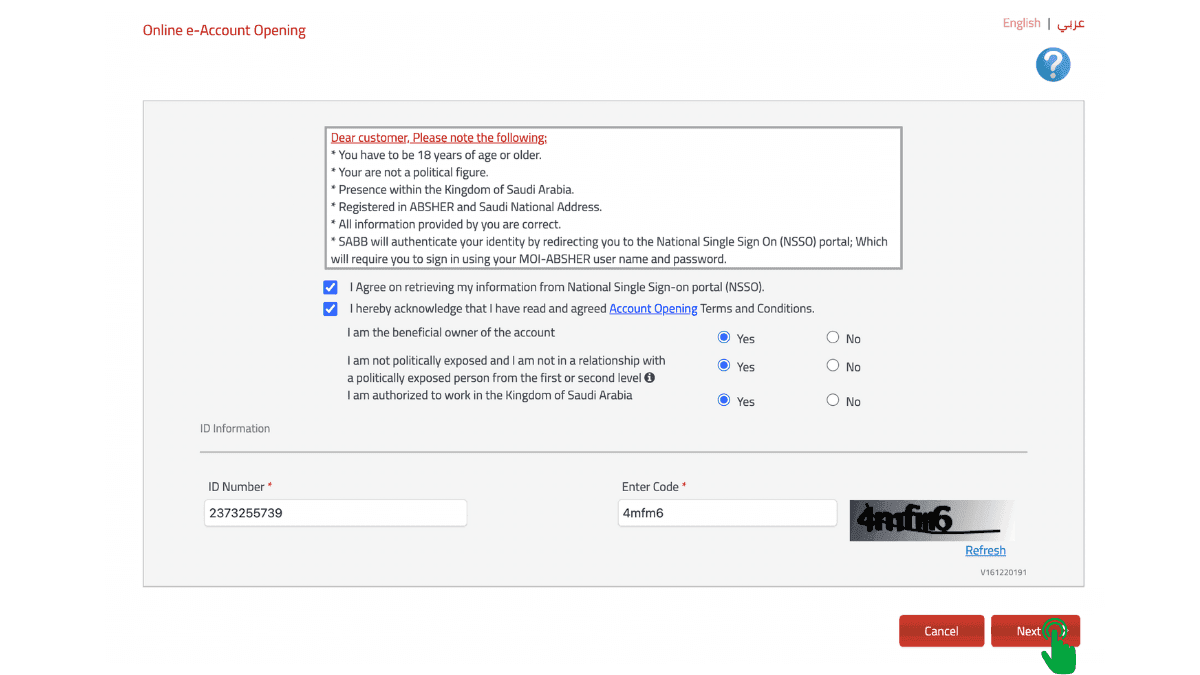
Make a checkmark next to the following lines:
- I Agree on retrieving my information from National Single Sign-on portal (NSSO).
- I hereby acknowledge that I have read and agreed Account Opening Terms and Conditions.
For the following questions, select Yes or No.
- I am the beneficial owner of the account.
- I am not politically exposed and I am not in a relationship with a politically exposed person from the first or second level.
- I am authorized to work in the Kingdom of Saudi Arabia.
Enter your “Iqama ID” and image code and then click “Next.”
You will be redirected to the National Single Sign-on portal, where you need to enter your “Absher username” and “password” and click on “login“.
Enter the OTP received on your Absher registered mobile number.
Click on “Continue.”
Personal Information
The following window will display your iqama data and registered national address. You’ll need to include a few details here.
- Marital Status
- Country of Birth
- City of Birth
- Contact number
- Email address.
If you have accounts with other banks, you may enter their information here or simply select No.
Then click on “Next.”
Addresses
Here, you can enter the address of your home country.
- Continent
- Country
- City
Then click “Next”
Employment and Preferences
Enter your employment information.
- Occupation Category
- Occupation (Iqama Profession)
- Employer Name
- Monthly Salary
Additionally, respond to the following question: Do you have other sources of income? Yes/No
Branch
Choose your city and the SABB branch that is closest to you.
Debit Card Delivery
Select the method by which you wish to receive your Mada debit card.
- Via Self Service Kiosk
- Through a SABB Branch
- Via Courier
SABB Direct (Phone Banking)
Create a six-digit PIN for SABB phone banking here.
SABB Net (Internet Banking)
Here, you can create a new SABB Net internet banking username and password.
Click on “Next.”
Also Read:
How to Open a Riyad Bank Account Online: Step by Step Guide
Anticipated Financial Activities
On the following page, enter the anticipated annual transactions.
- Anticipated annual deposits and withdrawals
- Annual local transfers anticipated
- Anticipated overseas transfers
Click on “Submit“
Enter the OTP.
Click on “Verify“
You’ve now opened a SABB Bank account successfully. The following page will display all of the information associated with your account, including:
- Account Type
- Account Number with IBAN
- SABB Direct ID
- SABB Net Username and Password
More in this guide
- Jawazat Clarifies the Conditions for Electronic Authorization through Absher. — Saudi Jawazat clarifies the conditions and services available under electronic authorization through the Absher platform
- Top-Selling Cars in Saudi Arabia in Q1 2026 — Toyota Yaris led Saudi Arabia’s best-selling cars in Q1 2026, while Toyota remained the Kingdom’s top car brand
- Saudi Arabia Raises BNPL Limit to SAR 10,000 — But Not Everyone Will Get It — Saudi Arabia has raised the maximum BNPL financing limit to SAR 10,000, but not every customer will qualify for the full amount
- How to Correct Your Name on Iqama: A Step-by-Step Guide — Learn how to easily correct or change your name on your Iqama with our step-by-step guide, whether the error is in Arabic or English
- How to Change Mobile Number in SNB AlAhli Bank — Here is How to Change your Registered Mobile Number with your SNB AlAhli Bank Account via SNB Self Service Kiosk or SNB ATM
- Iqama Red Green Check: Nitaqat Status 2026 — See what each color means in 2026