Iqama Red Green Check: Nitaqat Status 2026
Check your employer's Iqama red-green/Nitaqat status on MHRSD using an Iqama, border, or passport number. See what each color means in 2026.
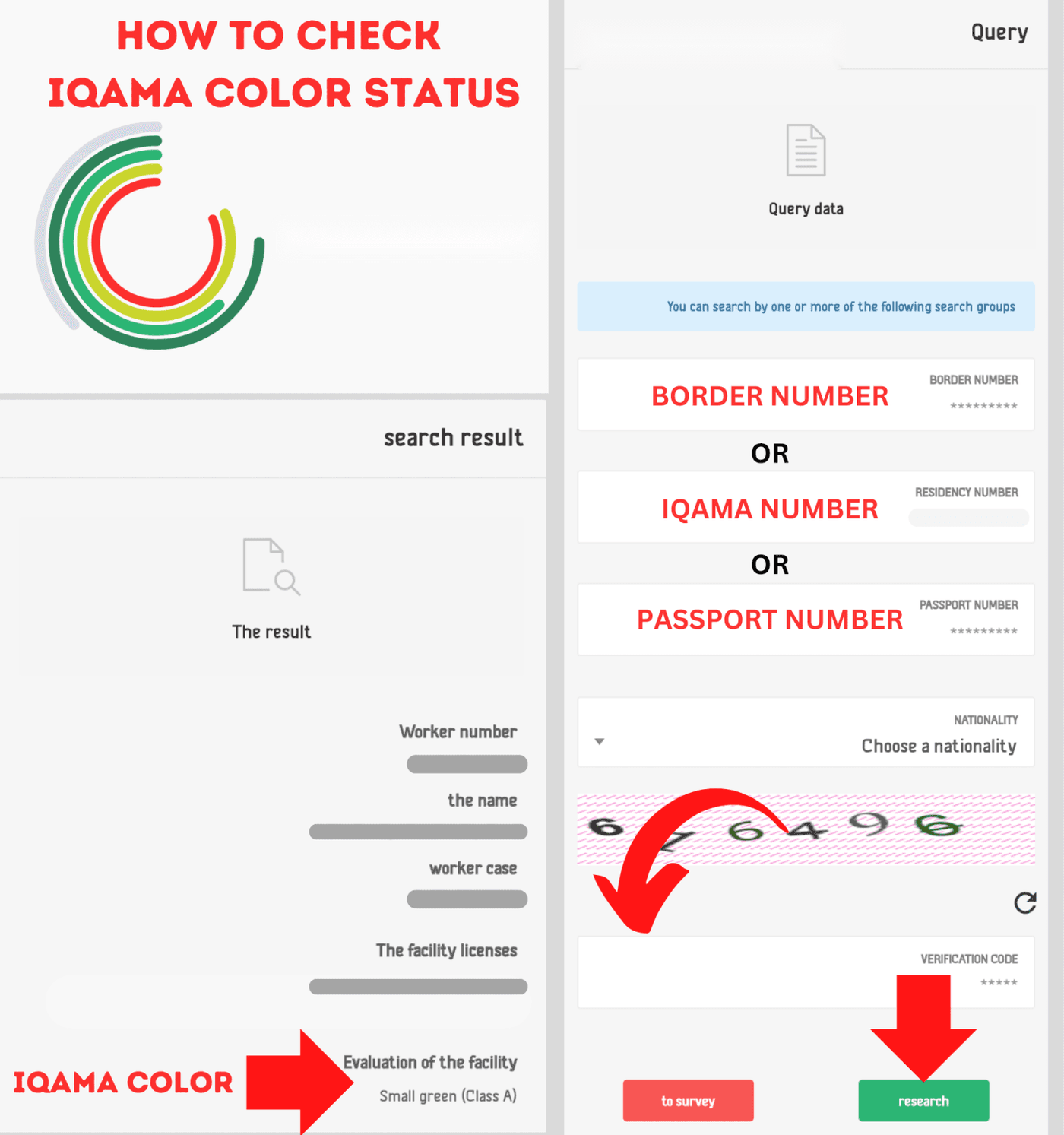
To check your Iqama red-green status, open the official MHRSD Non-Saudi Employee Inquiry, enter your Iqama number, border number, or passport number, complete the captcha, and select Search. If you use a passport number, select your nationality as well. The result describes your employer’s Nitaqat range and you do not need an Absher login.
Check on the official MHRSD website
Last verified: August 2, 2026
What “Iqama red or green” actually means
People often look for “Iqama color,” “Mosasa red or green,” or “company color status.” All three usually refer to the same thing: the Nitaqat classification of the private-sector establishment employing the worker.
Nitaqat is Saudi Arabia’s establishment-evaluation program for Saudization. A stronger range gives an employer access to more labor services. A weak range can restrict services such as new expatriate visas, occupation changes, incoming employee transfers, and work-permit renewal.
The color does not appear on your Iqama card. It is also different from:
- Iqama expiry or validity
- Huroob or “absent from work” status
- Traffic fines
- Exit/re-entry visa status
- Health-insurance validity
If you only need the expiry date, use our Iqama expiry check guide instead.
How to check Iqama red-green status on MHRSD
Step 1: Open the official expatriate employee inquiry
Go to the MHRSD Non-Saudi Employee Inquiry. MHRSD is the Ministry of Human Resources and Social Development, previously commonly called the Ministry of Labor or MoL.
The inquiry may open in Arabic. The portal offers language options, but if the interface remains Arabic, use your browser’s translate feature.
Step 2: Choose the identification number you have
The form provides three search routes:
| Your situation | Use this field | What else is required |
|---|
Use one accurate number. Do not enter spaces or non-numeric characters in the Iqama or border-number field.
Step 3: Select nationality when using a passport
The official form requires nationality with a passport-number search. A passport number without nationality can return an error even when the number is correct.
Step 4: Enter the captcha and search
Type the image verification code exactly as shown, then select Search. If the captcha is unclear, refresh it rather than repeatedly submitting a guessed code.
Step 5: Read the establishment and employment result
The result can include expatriate employee information, employment status, employer or establishment information, work-permit details, and the establishment’s Nitaqat range. Look for the establishment evaluation or range rather than expecting a color on the Iqama itself.
What each Nitaqat color means in 2026
The official Developed Nitaqat procedural guide uses five establishment ranges: Platinum, High Green, Medium Green, Low Green, and Red. The precise Saudization threshold varies by economic activity and workforce size.
| Nitaqat range | General meaning | Key employer services in the official guide |
|---|
Source: MHRSD Developed Nitaqat Procedural Guide. Each labor service also has its own eligibility rules, so the color alone is not a final decision on an individual request.
Does the Yellow Nitaqat category still exist?
Older guides may still mention the Yellow category, but HRSD discontinued it some years ago. Under the current Developed Nitaqat framework, establishments are classified as Red, Low Green, Medium Green, High Green, or Platinum.
What a Red result means for an expatriate employee
A Red result means the employer has not met the applicable Saudization requirement for its activity and size. Under the official procedural guide, a Red establishment cannot use several important employer services, including renewing an existing expatriate worker’s work permit.
Because a valid work permit is normally part of the Iqama-renewal process, a Red range can create renewal problems. It can also prevent the establishment from bringing in or transferring in additional expatriate workers.
One common wording mistake is to say that a Red company “cannot transfer employees.” The official restriction is more specific: the Red establishment cannot transfer expatriate workers into the entity. An individual worker’s ability to move out depends on the worker’s contract, Qiwa eligibility, labor-mobility rules, and the facts of the case.
If your employer is Red:
- Save a screenshot of the official result with the date.
- Ask HR whether the result is current and what corrective Saudization action is underway.
- Check your work-permit and Iqama expiry dates separately.
- Review your Qiwa employee profile for contract and mobility information.
- Contact MHRSD on 19911 or use an official complaint channel if renewal, wages, or employment rights are affected.
Do not pay an unofficial agent who promises to change the color or remove a restriction. Only the employer’s verified compliance and official Saudi systems can change the establishment range.
Why the Iqama red-green check may show no result
The Iqama or border number is wrong
Re-enter the number without spaces. Saudi Iqama numbers are normally ten digits. If you are a new arrival, try with the border number.
Passport nationality is missing
A passport search requires both the passport number and nationality on the current form.
The captcha has expired
Refresh the captcha and submit a new code. Avoid repeatedly refreshing the whole page because that can clear your other fields.
The worker is not covered by this inquiry
This is an inquiry for non-Saudi employees recorded in MHRSD labor systems. Dependents and some worker categories may not return the same establishment information. Use the official service responsible for that worker category.
The portal is temporarily unavailable
Try again later, use a private browser window, or switch between mobile data and Wi-Fi. Do not use a third-party page that asks you to upload your Iqama or passport.
Nitaqat changes beginning in 2026
MHRSD announced a new three-year phase of the Developed Nitaqat program beginning in 2026. The ministry expects the phase to support the localization of more than 340,000 additional private-sector jobs, with targets designed around labor-market conditions and the capacity of establishments in different sectors.
Frequently asked questions
Can I check Iqama red-green status without Absher?
Yes. The public MHRSD expatriate employee inquiry does not require an Absher login. Enter an Iqama, border, or passport number and complete the captcha.
Is this an Iqama-expiry check?
No. It checks employment and establishment information in the labor system. Check the Iqama expiry date separately through the relevant official service.
What does “Mosasa red or green” mean?
“Mosasa” or “musasa” is a common spelling of the Arabic word for establishment.
Can I use a border number before my Iqama is issued?
Yes. The current MHRSD form includes a border-number field for expatriate employee inquiries.
Does a Red employer mean my Iqama is automatically invalid?
No. Employer range, Iqama validity, work-permit validity, and employment status are related but separate records. Check each status directly before making a decision.
Can a Red company renew an employee’s Iqama?
The official Nitaqat guide says a Red establishment cannot renew an existing expatriate worker’s work permit. Since the work permit is normally required for Iqama renewal, the employer must resolve the restriction or obtain official guidance for the specific case.
Where can an employer calculate its Nitaqat range?
Employers can use the official Nitaqat calculator through the Saudi National Platform or Qiwa. The result depends on the establishment’s activity, workforce, and Saudization rate.
Official sources
- MHRSD Non-Saudi Employee Inquiry
- MHRSD Developed Nitaqat Procedural Guide
- MHRSD announcement of the new Developed Nitaqat phase
- Saudi National Platform: Nitaqat Calculator
Saudi labor regulations and service eligibility requirements may change. Use this guide to access and understand the official service, and always refer to the result displayed by MHRSD or Qiwa for your specific case.
More in this guide
- Jawazat Clarifies the Conditions for Electronic Authorization through Absher. — Saudi Jawazat clarifies the conditions and services available under electronic authorization through the Absher platform
- Top-Selling Cars in Saudi Arabia in Q1 2026 — Toyota Yaris led Saudi Arabia’s best-selling cars in Q1 2026, while Toyota remained the Kingdom’s top car brand
- Saudi Arabia Raises BNPL Limit to SAR 10,000 — But Not Everyone Will Get It — Saudi Arabia has raised the maximum BNPL financing limit to SAR 10,000, but not every customer will qualify for the full amount
- How to Correct Your Name on Iqama: A Step-by-Step Guide — Learn how to easily correct or change your name on your Iqama with our step-by-step guide, whether the error is in Arabic or English
- How to Change Mobile Number in SNB AlAhli Bank — Here is How to Change your Registered Mobile Number with your SNB AlAhli Bank Account via SNB Self Service Kiosk or SNB ATM
- How to Check Your Iqama Expiry Date and Validity Online — Learn how to check your Saudi Iqama expiry date and validity online using the Absher app, Absher website, or the HRSD portal without an account