How to Check Your Iqama Expiry Date and Validity Online
Learn how to check your Saudi Iqama expiry date and validity online using the Absher app, Absher website, or the HRSD portal without an account.
You can check your Iqama expiry date online through the Absher app or the Ministry of Human Resources and Social Development (HRSD) website. In Absher, open your profile and select My Resident ID. If you do not have an Absher account, use the HRSD route with your identity details, date of birth, and mobile verification.
Both methods help you find the expiry date recorded for your Iqama. The steps below explain what you need, where to find the date, and what to do if you cannot complete the check.
What You Need Before Checking
For the Absher app, have your login details and access to the mobile number registered with your account.
For the HRSD website, keep your Iqama number and date of birth ready, along with access to the registered mobile number for the one-time password (OTP).
How to Check Iqama Expiry in the Absher App
If you already use Absher, you can view your expiry date from your resident ID details:
- Open the Absher app. If you have not installed it, download the official app from your device’s app store.
- Tap Log in and enter your username and password.
- Enter the OTP sent to your registered mobile number.
- Tap your name beside your profile picture.
- Select My Resident ID.
- Find the expiry date in your Iqama details. This screen also shows information such as the issue date and ID version.
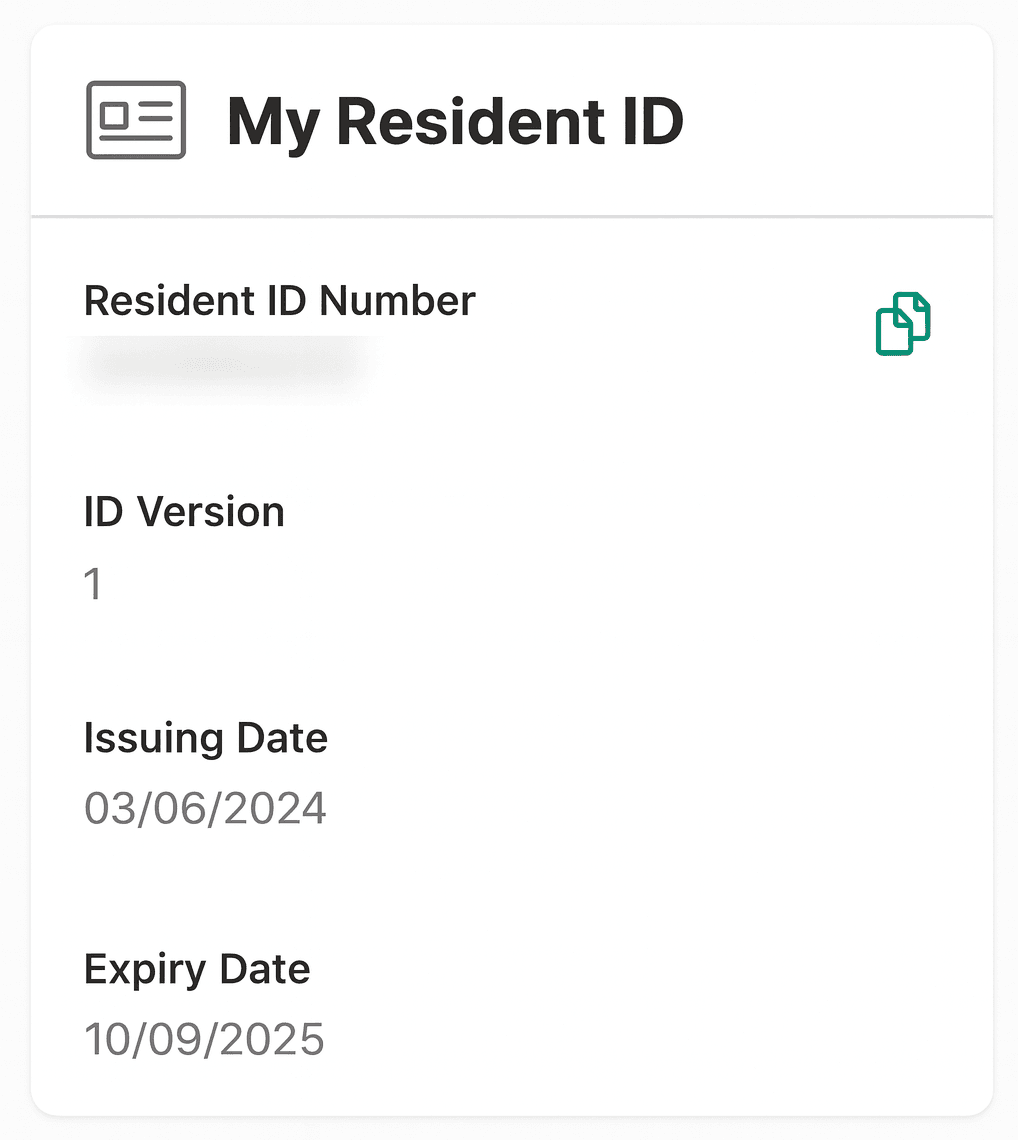
Read the expiry field carefully: the issue date tells you when the document was issued, while the expiry date is the one you need for checking its remaining validity. Menu placement may vary with app updates.
Checking Iqama Validity on the Absher Website
If you prefer using a browser, visit the official Absher website. The Public Query Resident ID Expiry service lets you check whether your Iqama is active or expired and view its expiry date. You may also see it listed as Query Iqama Expiry Service.
Sign in to Absher and open the enquiry. Enter your Iqama number and the visual verification code, then submit the request to view the result.
How to Check Iqama Expiry Without Absher
If you do not have an Absher account, you can use the HRSD individual user portal.
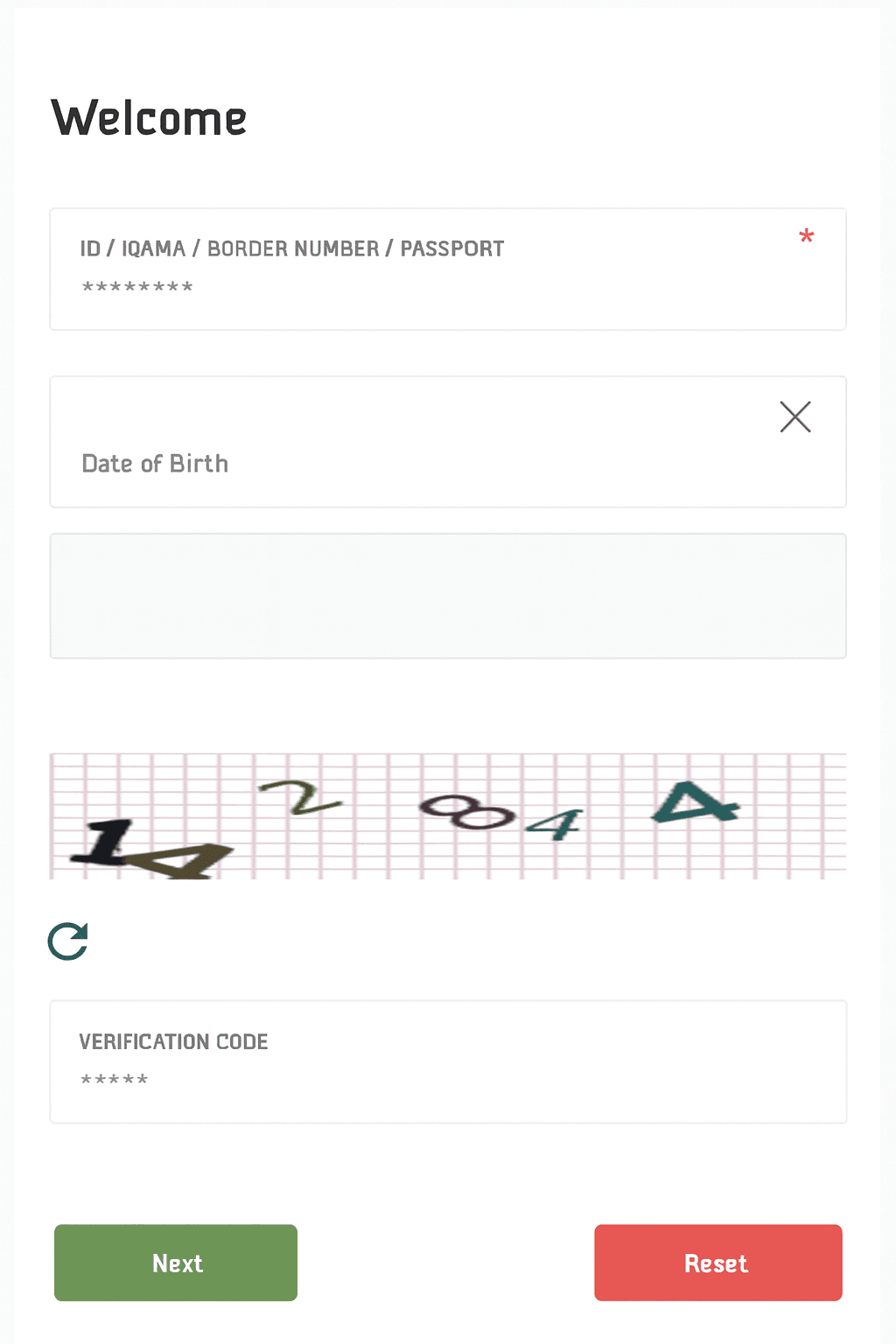
- Open the HRSD portal and review and accept the privacy notice to continue.
- Switch the language to English if needed.
- Enter your Iqama number. The form also provides options for a border number or passport number.
- Enter your date of birth, choosing the correct Hijri or Gregorian calendar.
- Complete the CAPTCHA and select Next.
- Enter the OTP sent to your registered mobile number.
- Review your details on the next screen and find the Iqama expiry date.
Choose the calendar before entering your birth date. A Gregorian date entered while Hijri is selected will not represent the same date and may prevent the form from matching your details.
“Without Absher” does not mean without verification. This method does not require an Absher account, but the HRSD process includes mobile verification. Keep access to the registered number available before starting.
What About the MOL Iqama Expiry Check?
The former Ministry of Labour (MOL) online portal is now available through the Ministry of Human Resources and Social Development (HRSD) website.
If you are looking for the MOL Iqama expiry check, use the HRSD portal and follow the steps above to check your expiry date without an Absher account.
Reading the Expiry Date Correctly
Check whether the date is displayed in Hijri or Gregorian format before comparing it with today’s date. Hijri dates may be labelled AH or هـ. The year and month numbers in the two calendars are different, so they cannot be compared directly.
If you need to understand a Hijri date in Gregorian terms, use our Hijri-to-Gregorian date converter. A converter helps you interpret a date; it does not check your government record or confirm that your Iqama has been renewed. Refer to the official record for the expiry date itself.
Once you have checked it, set a reminder ahead of expiry so you have time to follow up on renewal. After a renewal is completed, check again for the updated date.
If the Iqama Expiry Check Is Not Working
Your details are not accepted: Recheck the identity number, date of birth, and selected calendar. Enter the details as recorded in your official documents.
The CAPTCHA fails: Refresh the visual code if necessary and enter the new code shown. A CAPTCHA error by itself does not tell you anything about your Iqama’s validity.
The OTP does not arrive: Make sure that your registered SIM can receive messages. If you no longer have access to the number, update your new number with relevant platforms.
The page will not load: Try again later or use the other official method if you have the required access. A loading error is not evidence that an Iqama has expired. If you are checking from outside Saudi Arabia, some portals may not work as they may have country restrictions.
The old date still appears after renewal: Ask the person or team handling your renewal to confirm that it was completed successfully. Recheck the official record and follow up through the relevant government service if the discrepancy continues.
What to Do If Your Iqama Has Expired
Contact your employer, sponsor, or the person responsible for your renewal promptly to confirm the next steps. If renewal has already been requested, ask whether it is complete or whether something remains outstanding.
Frequently Asked Questions
Can I check my Iqama expiry using only my Iqama number?
The number alone is not enough for the methods described here. Absher requires account access or the verification requested by its enquiry service. The HRSD route asks for identity details, a date of birth, CAPTCHA, and an OTP.
Can I check my Iqama expiry date from outside Saudi Arabia?
Yes. Use the HRSD portal to check your Iqama expiry date from outside Saudi Arabia, as Absher is currently unavailable abroad. Follow the HRSD steps above using your Iqama number and date of birth, then complete the CAPTCHA and OTP verification. You will need access to your registered mobile number to receive the code.
Does a valid Iqama mean my insurance, visa, or employment status is also valid?
These are separate checks. An Iqama expiry result should not be used as confirmation of health insurance coverage, exit/re-entry visa validity, or a worker’s absence-from-work status. Likewise, an employer’s Nitaqat colour is a different matter from your personal Iqama expiry date.
For those questions, see our guides to checking health insurance status and checking Nitaqat red and green status.
Sources
- Absher - The official Ministry of Interior e-services platformabsher.sa(opens in a new tab)
- Ministry of Human Resources and Social Development (HRSD)hrsd.gov.sa(opens in a new tab)
- General Directorate of Passports (Jawazat)gdp.gov.sa(opens in a new tab)
More in this guide
- Jawazat Clarifies the Conditions for Electronic Authorization through Absher. — Saudi Jawazat clarifies the conditions and services available under electronic authorization through the Absher platform
- Top-Selling Cars in Saudi Arabia in Q1 2026 — Toyota Yaris led Saudi Arabia’s best-selling cars in Q1 2026, while Toyota remained the Kingdom’s top car brand
- Saudi Arabia Raises BNPL Limit to SAR 10,000 — But Not Everyone Will Get It — Saudi Arabia has raised the maximum BNPL financing limit to SAR 10,000, but not every customer will qualify for the full amount
- How to Correct Your Name on Iqama: A Step-by-Step Guide — Learn how to easily correct or change your name on your Iqama with our step-by-step guide, whether the error is in Arabic or English
- How to Change Mobile Number in SNB AlAhli Bank — Here is How to Change your Registered Mobile Number with your SNB AlAhli Bank Account via SNB Self Service Kiosk or SNB ATM
- Iqama Red Green Check: Nitaqat Status 2026 — See what each color means in 2026