How to Pay Your Iqama Renewal Fee Online or at an ATM
Learn how to pay your Iqama renewal fee online in Saudi Arabia with ease. This article provides guide you on how to pay your iqama fee online.
How to Pay Iqama Renewal Fee
If you’re living in Saudi Arabia as an expatriate, it’s crucial to keep your Iqama (residency permit) up to date by paying the necessary fees on time. However, paying these fees might seem intimidating, especially if you’re new to the country or unfamiliar with the process. But don’t worry, it’s actually quite simple! In this blog article, we will guide you step-by-step on how to pay Iqama fees online or at an ATM. By following these instructions, you can stay compliant with Saudi Arabia’s regulations and avoid any fines or penalties.
Paying Iqama Renewal Fee Online
Through SNB Alahli Bank Online
Follow these simple steps to pay your Iqama renewal fee online using the SNB Alahli Bank App:
- Download the SNB Mobile app from the Play Store or App Store.
- Log in to your internet banking account.
- Click on “Menu“.
- Select “SADAD”.
- Click on “Government Payments & Refund“.
- Select the biller “Alien Control“.
- Choose “Renew Iqama” from the list of services.
- Select “Unregistered“.
- Enter your Iqama number.
- Choose the duration of your Iqama in months (3, 6, 9, or 12 months).
- Click on “Request Payment Fee“.
- Review your Iqama details and fee and click on “Proceed“.
- Click on the “Confirm” button to complete the payment.
- Enter the OTP received on your mobile to complete the payment
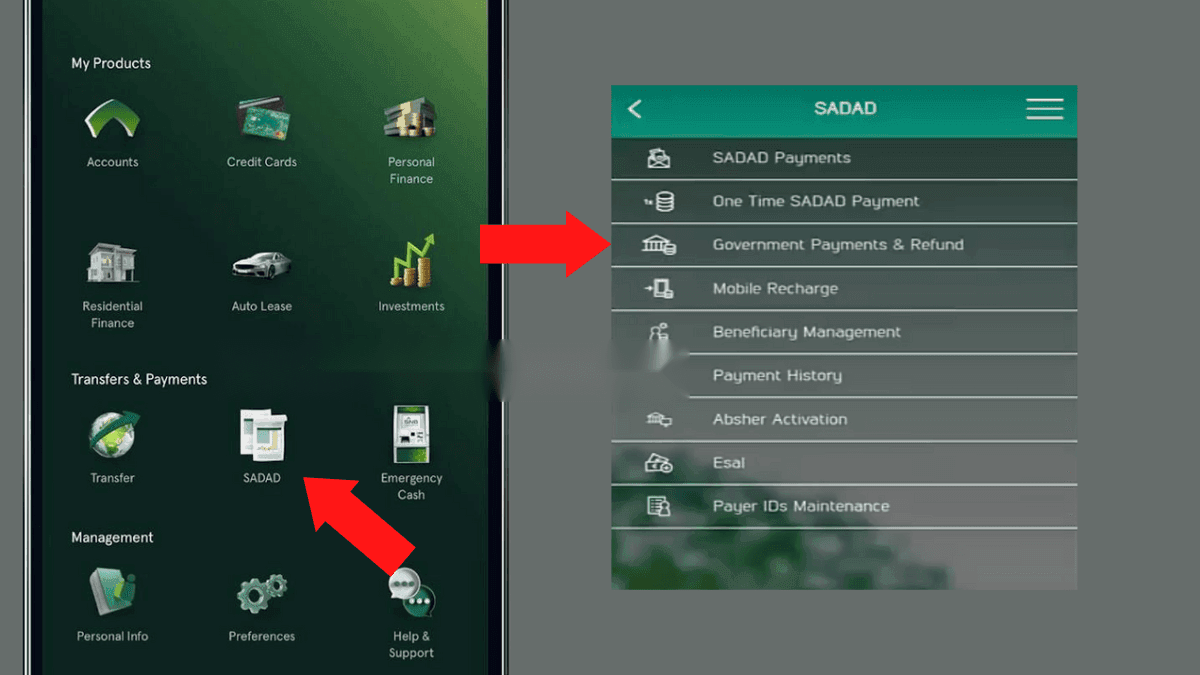
By following these steps, you can easily pay your Iqama renewal fee online using the SNB Alahli Bank App.
Also Read: How to Check Iqama Funds Online
Through Al Rajhi Bank Online
Follow these simple steps to pay your Iqama renewal fee online using the Al Rajhi Bank app:
- Download the Alrajhi Bank Mobile app.
- Log in to your online banking account.
- Select the “Payments” option.
- Click on the “Government Payment” button.
- Select “Alien Control“.
- Choose “Renew Iqama” as the application type.
- Select “Payment” as the transaction type.
- Enter your Iqama number.
- Select your Iqama fee duration (3, 6, 9, or 12 months).
- Choose your account.
- Review the fees and Iqama details, and click on the “Confirm” button.
- Enter the verification code received on your mobile to complete the payment.
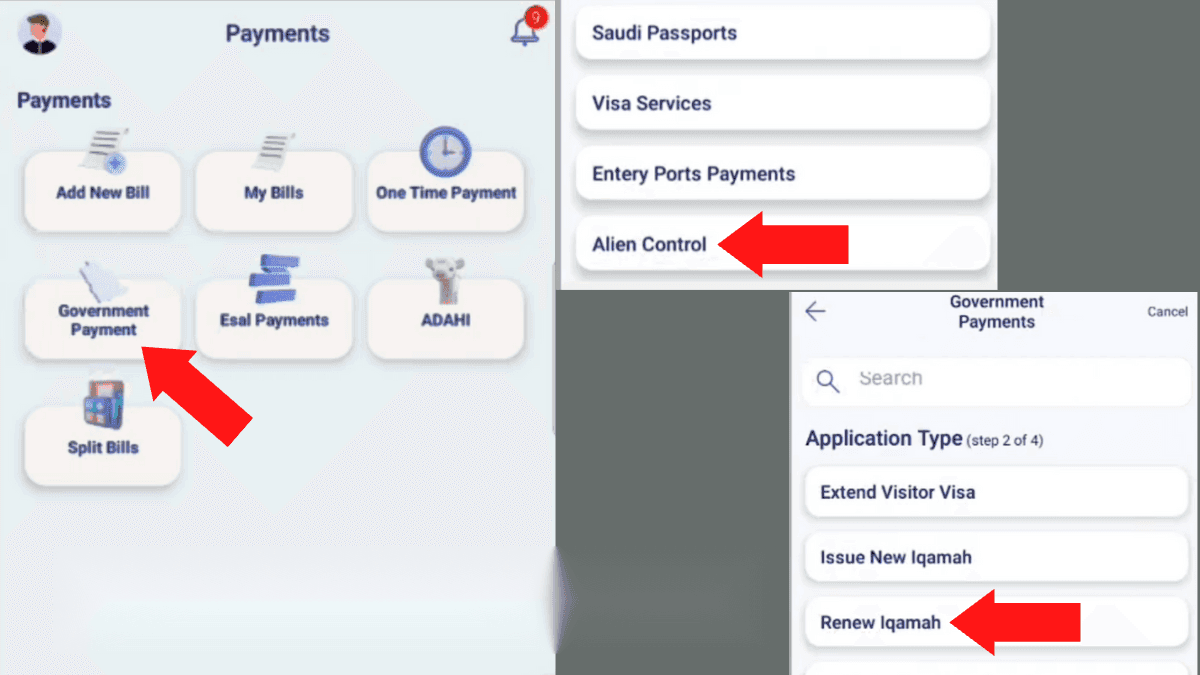
By following these steps, you can pay your Iqama renewal fee online using the Al Rajhi Bank app, saving you time and ensuring that you stay compliant with Saudi Arabia’s regulations.
Related: Iqama Renewal Fees 2023
Paying Iqama Renewal Fee at an ATM
Here’s a guide on how to pay your Iqama renewal fee using SNB Alahli and Al Rajhi Bank ATMs.
At SNB Al Ahli ATM
To pay the renewal fee for your Iqama at an SNB ATM, simply follow these easy steps:
- Go to the nearest SNB ATM.
- Insert your ATM card and enter your PIN.
- Choose “Yes” when asked if you want a receipt.
- Select “Bills Payment” and then “New Bill“.
- Look for “MOI” in the list of biller groups and select it.
- Choose “Alien Control” and press “Select“.
- Click “Renew Iqama” and then “Select“.
- Select the “Pay” option.
- Enter your Iqama number and duration, and then press “Enter“.
- The amount you need to pay will be displayed; press “Pay Exact” to complete the payment.
- Collect your payment receipt.
At Al Rajhi Bank ATM
To pay the renewal fee for your Iqama at an Al Rajhi ATM, just follow these simple steps:
- Go to the nearest Al Rajhi Bank ATM.
- Insert your ATM card and select English.
- Enter your ATM PIN.
- In the main menu, select “Government Payments“.
- Next, select “Payment“.
- Select the “Alien Control” service from the list of options.
- Choose the “Renew Iqama” option.
- Enter your Iqama number and click on “Confirm“.
- Select the duration of your Iqama in months.
- The ATM screen will display your name, Iqama number, and the amount required to pay. Verify this information and click on “Confirm“.
- Collect your payment receipt.
Conclusion
In conclusion, paying your Iqama renewal fees has become more convenient than ever before, thanks to the online and ATM payment options. By following the simple steps outlined in this article, you can quickly and easily pay your Iqama renewal fees from anywhere. This saves you time and helps you avoid any penalties for late payments. We hope that this guide has been helpful and informative, providing you with the necessary information to pay your Iqama renewal fees with ease.
More in this guide
- Jawazat Clarifies the Conditions for Electronic Authorization through Absher. — Saudi Jawazat clarifies the conditions and services available under electronic authorization through the Absher platform
- Top-Selling Cars in Saudi Arabia in Q1 2026 — Toyota Yaris led Saudi Arabia’s best-selling cars in Q1 2026, while Toyota remained the Kingdom’s top car brand
- Saudi Arabia Raises BNPL Limit to SAR 10,000 — But Not Everyone Will Get It — Saudi Arabia has raised the maximum BNPL financing limit to SAR 10,000, but not every customer will qualify for the full amount
- How to Correct Your Name on Iqama: A Step-by-Step Guide — Learn how to easily correct or change your name on your Iqama with our step-by-step guide, whether the error is in Arabic or English
- How to Change Mobile Number in SNB AlAhli Bank — Here is How to Change your Registered Mobile Number with your SNB AlAhli Bank Account via SNB Self Service Kiosk or SNB ATM
- Iqama Red Green Check: Nitaqat Status 2026 — See what each color means in 2026