How to Open an Account with SNB Alahli Bank Online
Read this blog post to learn the step-by-step process of SNB online account opening so that you can open an account with AlAhli in no time.
SNB Online Account Opening: Everything You Need to Know
Saudi National Bank (SNB) also known as Alahli Bank is one of the largest banks in Saudi Arabia. It offers a variety of banking products and services, including current accounts, credit cards, and loans. SNB also offers online banking, which allows customers to access their accounts and perform transactions from anywhere in the world. In this article, we will guide you through the process of how to open an SNB account online.
SNB Account Opening Requirements
To open an account with SNB AlAhli Bank, you must:
- Have a valid Iqama with more than 30 days of validity.
- Complete your Absher registration.
- Register your national address.
- Register for Nafath.
- Have a valid Saudi mobile number.
How to Open an AlAhli Bank Account Online
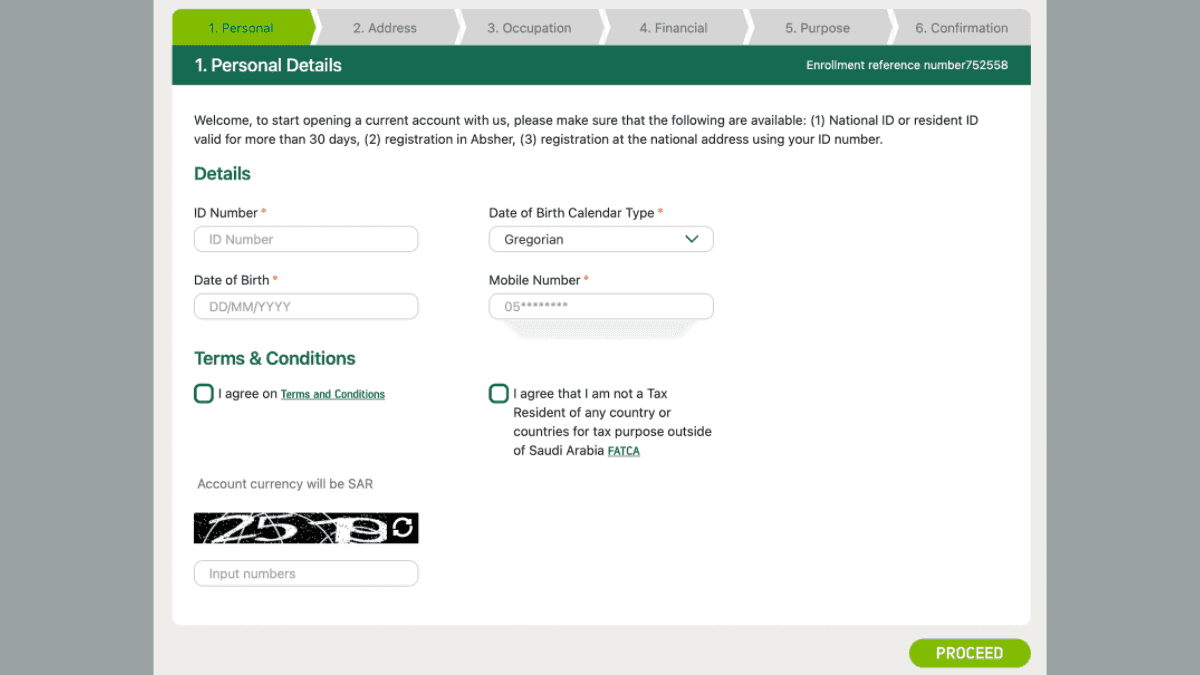
- Go to the AlAhli Bank website: https://www.alahli.com/en-us/personal-banking/accounts/Pages/Online-Account-Opening.aspx
- Click on the link next to “Open your account online now.”
- Enter your Iqama number and select your date of birth calendar (Hijri or Gregorian).
- Enter your date of birth and mobile number.
- Agree to the terms and conditions and click “Proceed.”
- Enter the OTP that was sent to your mobile number.
- Fill in your personal details, including:
- Residency status
- Marital status
- Country of birth
- Place of birth
- National address details
- Contact information
- Enter your home country address information, including:
- Building number
- Street name
- City
- Postal code
- Additional number
- Enter your occupation details, including:
- Employment status
- Academic qualifications
- Employer name
- Job title
- Work information
- Provide your financial details, including:
- Source of income
- Monthly payment income method
- Primary income amount
- Wealth level
- Enter your purpose details, including:
- Account opening reason
- Name of main depositors
- Main beneficiary name
- Total expected monthly transfers
- Verify the information you provided by using your Nafath account.
- Enter the secret code that was sent to your mobile number.
- Your account has been successfully created with a new SNB account number.
- Register for online banking and choose a method for receiving your Mada Debit Card (print via self-service kiosk or mail).
Conclusion
Opening an SNB account online is a quick, easy, and convenient way to start banking with one of the largest banks in Saudi Arabia. By following the steps outlined in this article, you can open an account in just a few minutes.
More in this guide
- Jawazat Clarifies the Conditions for Electronic Authorization through Absher. — Saudi Jawazat clarifies the conditions and services available under electronic authorization through the Absher platform
- Top-Selling Cars in Saudi Arabia in Q1 2026 — Toyota Yaris led Saudi Arabia’s best-selling cars in Q1 2026, while Toyota remained the Kingdom’s top car brand
- Saudi Arabia Raises BNPL Limit to SAR 10,000 — But Not Everyone Will Get It — Saudi Arabia has raised the maximum BNPL financing limit to SAR 10,000, but not every customer will qualify for the full amount
- How to Correct Your Name on Iqama: A Step-by-Step Guide — Learn how to easily correct or change your name on your Iqama with our step-by-step guide, whether the error is in Arabic or English
- How to Change Mobile Number in SNB AlAhli Bank — Here is How to Change your Registered Mobile Number with your SNB AlAhli Bank Account via SNB Self Service Kiosk or SNB ATM
- Iqama Red Green Check: Nitaqat Status 2026 — See what each color means in 2026