Al Rajhi Mobile Registration: Your Complete Guide
Discover the easy step-by-step guide to registering for Al Rajhi Bank's mobile banking service. Learn how to activate the app.
Al Rajhi Mobile Registration
As we move towards a digital future, it’s essential to have our banking details at our fingertips. For Al Rajhi Bank customers, their mobile app provides easy, secure, and convenient access to their bank account and services. This blog post will provide a step-by-step guide for registering on the Al Rajhi Bank mobile app for both new users and those existing customers who want to activate the app on a new device.
Case #1: Existing Users Want to Register on a New Device
If you are already an Al Rajhi mobile banking user and wish to activate the app on a new device, follow these steps:
- Download the Al Rajhi mobile app from the Apple App Store or the Google Play Store.
- Launch the app and select English.
- Choose the login option and enter your username (Iqama number) and password.
- You will see an “Unregistered Device” message on your phone’s screen. Click “Add Device to Trusted List” to activate your new device.
- Then, you will have two options: “Activate Using Another Device” or “Receive a Call”.
- Select the Receive a Call option and wait for the call from Al Rajhi Bank.
- Answer the call and enter the OTP (One-Time Password) received on your registered mobile number for verification.
- After successful verification, log in to the app with your username and password.
- Now go to settings, turn on the MPIN option, and set a 5-digit code. The MPIN simplifies your access to the app as you won’t need to enter your username and password each time, just this 5-digit code.
Also Read: 13 Useful Features of the Tahweel Al Rajhi Mobile App
Case #2: New User Registration
If you are a new customer who opened your bank account through a branch and have not registered for Al Rajhi Bank mobile banking, you can do so by providing your Iqama number and Mada card information. Here’s how:
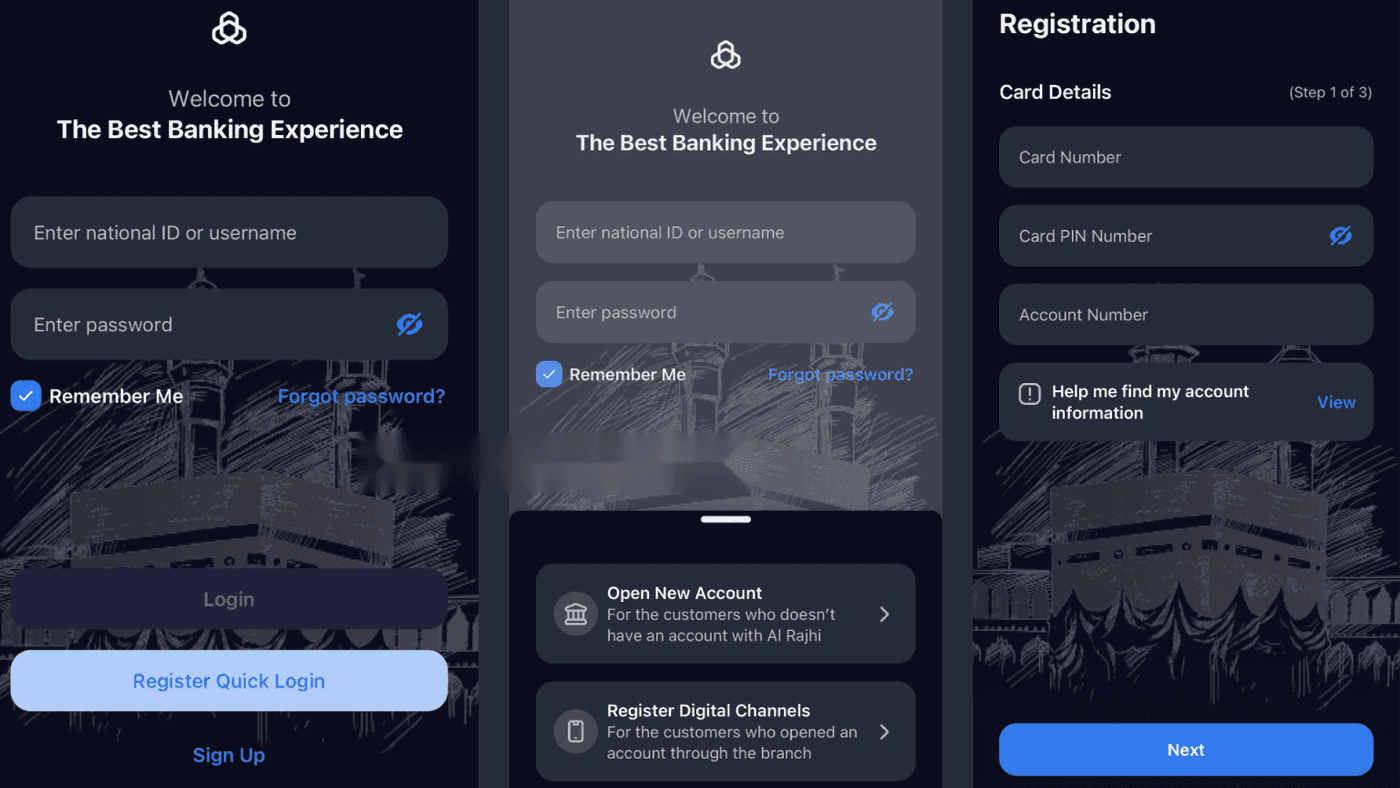
- Launch the Al Rajhi mobile app.
- Select the “Sign Up” option.
- Then, select “Register Digital Channels“.
- Provide your Iqama number and select “Use Card Method“.
- Enter your Mada card number, card PIN, and account number, then click the “Next” button.
- After successful validation, set your password and complete the registration.
Congratulations, now you have completed the registration process!
Conclusion
The Al Rajhi Bank mobile app brings the banking world to your fingertips. It provides a fast, simple, and secure way to manage your accounts, transfer money, pay bills, and access various other banking services. It is designed with the highest level of security to keep your banking details private and fully protected. Whether at home, at work, or on the move, Al Rajhi mobile banking allows you to bank anytime, anywhere.
Remember, if you encounter any issues during registration or usage of the app, the Al Rajhi Bank customer service team is available to assist you. Digital banking is all about making your life easier, and Al Rajhi Bank is committed to doing just that. Welcome to the future of banking!
- How to Open Al Rajhi Bank Account Online
- How to Register for Al Rajhi Phone Banking for the First Time
- Activation of Absher Account Through Al Rajhi Bank: Simple Guide
- How to Update Iqama Expiry Date with Al Rajhi Bank
- How to Pay Your Iqama Renewal Fee Online or at an ATM
- How to Register with Almubasher Retail Online Banking
More in this guide
- Jawazat clarifies procedure to renew expired final exit visa — Avoid penalties and ensure valid Iqama status
- Jawazat: Final Exit Visa Requires 30-Day Iqama Validity — Learn the key rules for issuing the visa
- Saudi Arabia Executes 4 Expats in Murder and Drug Smuggling Cases — Saudi Arabia executed four expats in separate murder and drug smuggling cases in Makkah and Asir
- How to Register for Al Rajhi Phone Banking for the First Time — How to register in Al Rajhi phone banking and what is the Al Rajhi phone banking number and what are the features of this service
- Saudi Tourist Visa: Everything You Need to Know — Plan your trip now!
- Schengen, UK, and US Visa Holders Can Now Get Saudi eVisa — Here's How — If you hold a valid visa from a Schengen country, the UK, or the USA: you can now apply for a Saudi Arabia eVisa regardless of your nationality