How to Open an Al Rajhi Bank Account Online in Saudi Arabia (2026 Guide)
Open Al Rajhi Bank account online in Saudi Arabia with Iqama or Visitor ID. Step-by-step guide for expats, free Mada card, no branch visit needed.
Opening an Al Rajhi Bank account has become much easier with the bank’s mobile app. If you meet the eligibility requirements, you can complete the entire account opening process online without visiting a branch.
This guide explains the requirements and every step involved in opening an Al Rajhi Bank account through the official mobile application.
Requirements for Opening an Al Rajhi Bank Account Online
Before you begin, make sure you have the following:
- A valid Iqama or National ID
- An active Absher account with an updated Nafath account
- A mobile number registered in your name or in the name of a first-degree relative
- A registered National Address with Saudi Post (required for Iqama holders)
Step 1: Download the Al Rajhi Mobile App
Download and install the official Al Rajhi Bank mobile application from your device’s app store.
After installing the app:
- Allow the app to access your location when prompted.
- Open the app and tap Become a Member.
Step 2: Enter Your Basic Details
Enter the following information:
- Mobile number
- Iqama number
Read the terms and conditions, tick the required agreement boxes, and tap Next.
You will receive a one-time password (OTP) on your registered mobile number. Enter the OTP to verify your number.
Step 3: Fill in Your Personal Information
Provide your personal details, including:
- Education level
- Purpose of opening the account
- Email address
- Home country address
After completing the information, tap Next.
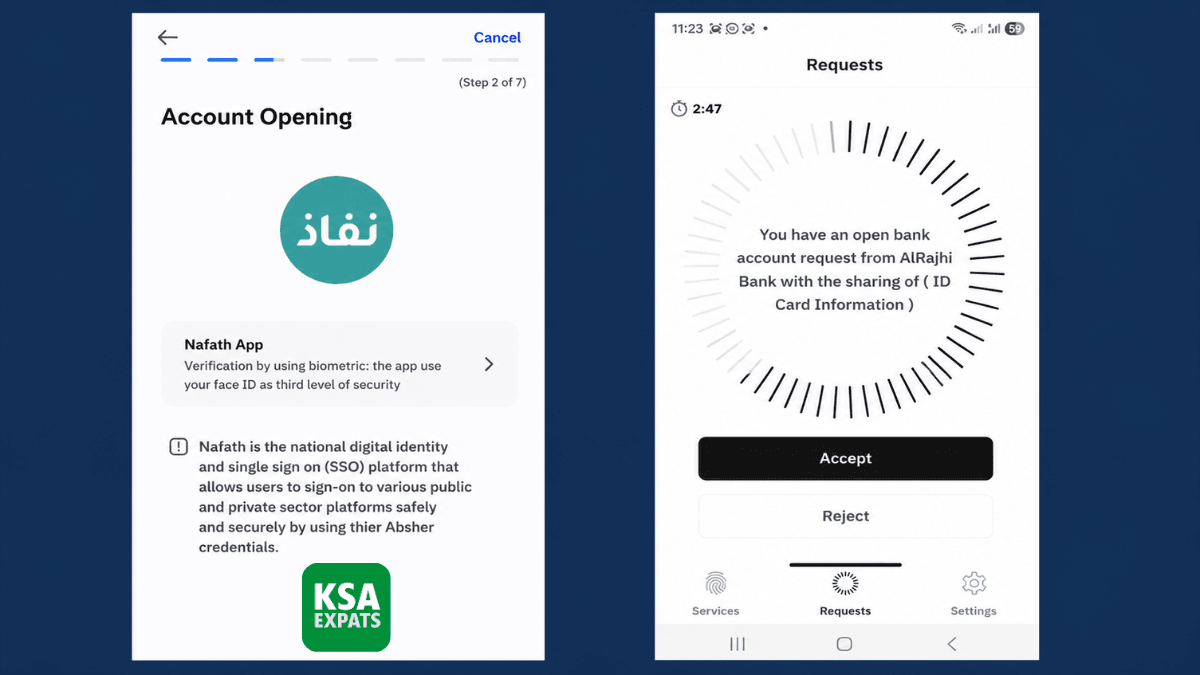
Step 4: Verify Your Identity Using Nafath
The app will redirect you to verify your identity through the Nafath app.
Complete the authentication process and return to the Al Rajhi app.
Step 5: Confirm Your National Address
Your registered National Address will be displayed.
Review the information carefully and confirm that it is correct.
Step 6: Enter Personal Information
Provide additional personal details, including:
- Marital status (Married or Unmarried)
- Country of birth
- City of birth
Continue to the next step.
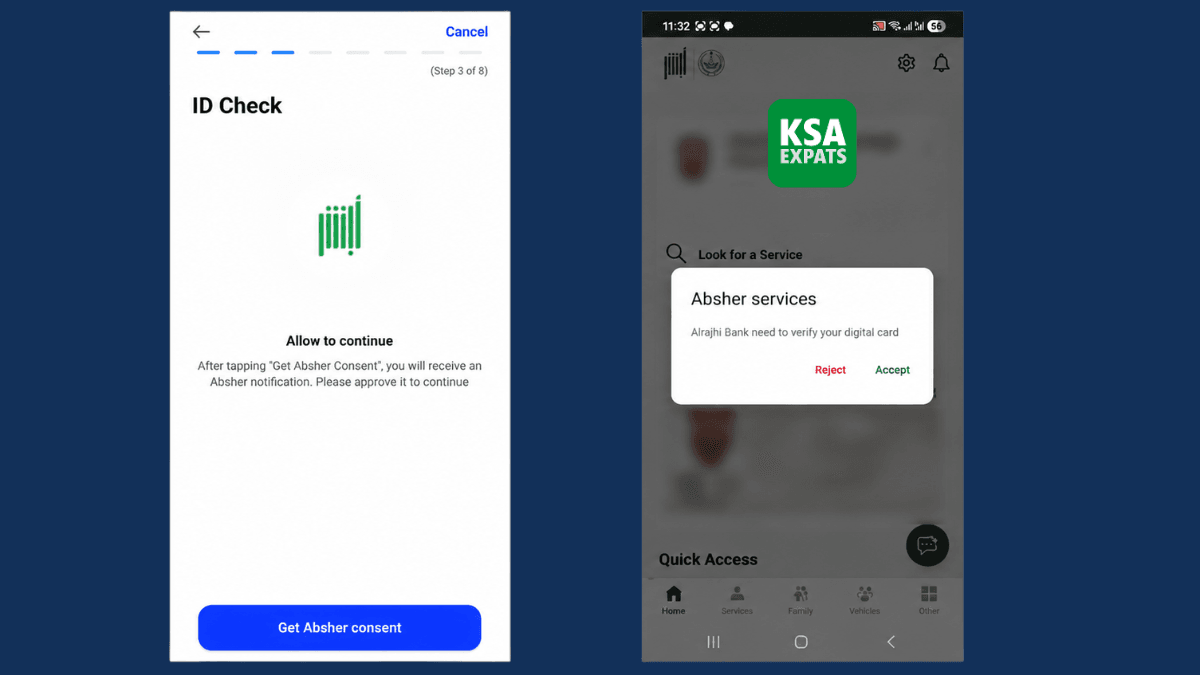
Step 7: Complete the Absher Identity Verification
Tap Get Absher Consent.
You will receive a notification from the Absher app.
Open the Absher app and sign in. A message stating that Al Rajhi Bank needs to verify your digital ID will appear.
Tap Accept and complete the verification using facial recognition or your fingerprint.
Once verification is complete, return to the Al Rajhi app.
Step 8: Provide Employment and Income Details
Enter your employment information, such as:
- Employment status (for example, Private Sector)
- Source of income (Salary)
- Monthly salary
- Additional income (Yes or No)
- Expected monthly deposits
- Expected monthly withdrawals
Tap Continue after completing the details.
Step 9: Add an Emergency Contact
Provide the details of a friend or family member, including:
- Full name
- Relationship
- Mobile number
This information may be used as an additional contact if required.
Step 10: Create Your Internet Banking Login
Choose a username and password for Al Rajhi online banking.
Username Requirements
- 8 to 20 characters
- Must contain both uppercase and lowercase letters
- No spaces
- No special characters
- No repeated characters
Password Requirements
- Minimum 8 characters
- At least one uppercase letter
- At least one lowercase letter
- At least one number
- No spaces
- No special characters
- No repeated characters
After creating your credentials, tap Confirm.
Step 11: Set Your ATM Card PIN
Choose any four-digit PIN for your debit card.
Enter the same PIN again to confirm it.
Step 12: Complete Phone Verification
The app will ask whether you want to receive an automated verification call immediately.
You can choose:
- Confirm to receive the IVR call right away
- Later to receive the call at another time
Answer the automated call and follow the voice instructions to complete the verification process.
Step 13: Receive Your New Account Details
Once verification is successful, the app will display your:
- Account Name
- Account number
- IBAN
- Other relevant details.
It is a good idea to save or take a screenshot of these details for future reference.
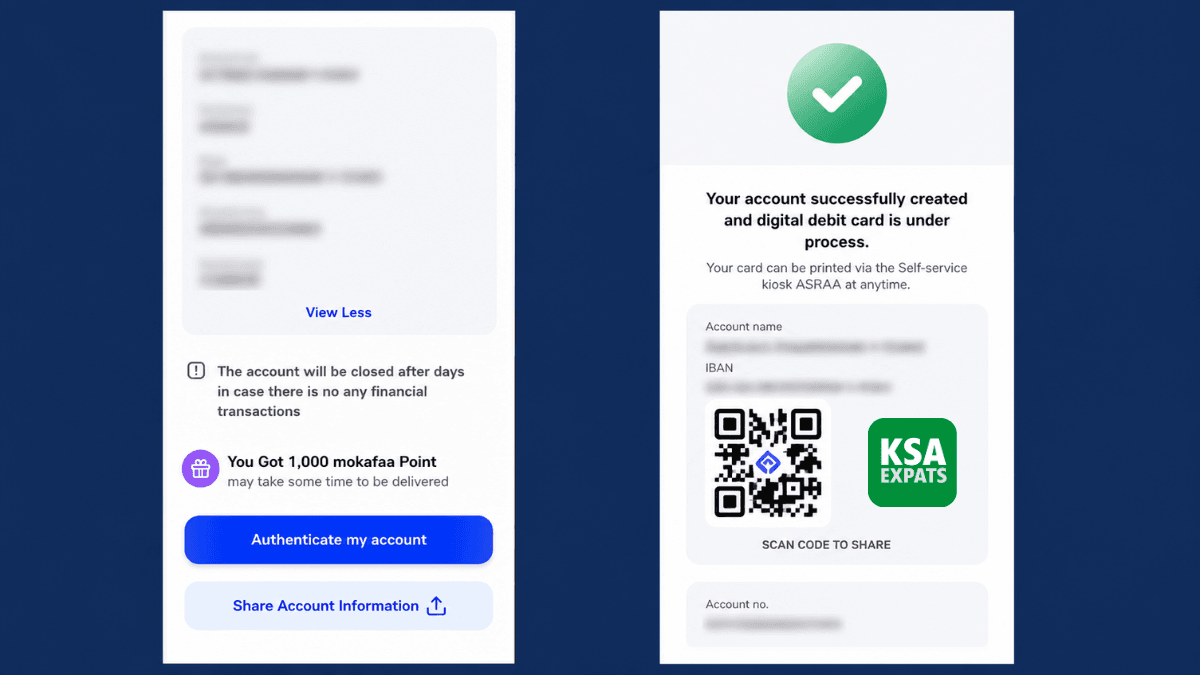
Step 14: Authenticate Your Account
Tap Authenticate My Account.
Accept the agreement and tap Submit Digital Signature.
Getting an Error?
If you see an error such as “Error received from backend”, don’t worry. Simply go back and in many cases, the issue resolves automatically.
Step 15: Verify Your Email Address
Tap Verify beside your email address.
Enter the OTP sent to your registered email to complete email verification.
Once verified, your Al Rajhi Bank account will be fully activated and ready to use.
How to Get a Physical Al Rajhi Debit Card
Although your account is ready for digital banking immediately, you can also obtain a physical debit card.
Simply visit the nearest Al Rajhi Self-Service Kiosk to print your debit card.
Final Thoughts
Opening an Al Rajhi Bank account online is a straightforward process that can be completed entirely through the mobile app. As long as you have an active Iqama, Absher, Nafath, and a registered National Address, you can create your account without visiting a branch.
After completing identity verification, setting up your online banking credentials, and verifying your email, your account will be ready for transfers, salary deposits, online banking, and other banking services.
More in this guide
- How to Add Your Credit/Debit Card to Apple Pay — Saudi Arabia is one of the few countries that Apple Pay can be used in. In this blog, we explain how to add your bank card to Apple Pay
- Al Rajhi Bank Mada Card: How to Renew and Print at Kiosk — This article explains how to renew and print your Al Rahji Bank ATM card (mada card) through a self-service kiosk without visiting the branch
- Al Rajhi Bank Credit Cards 2023 — From rewards programs to flexible repayment..
- Saudi Post's Awfar Service: Everything You Need to Know — Awfar is a service provided by Saudi Post for consumers who want their products delivered to their preferred address
- Best 10 Residential Compounds in Riyadh — Learn about the top compounds in the city, their features and amenities
- Best Credit Cards for Expatriates in Saudi Arabia 2026: Complete Guide — Compare top cards, eligibility requirements, benefits, and how to apply as an expat