Al Rajhi Bank Mada Card: How to Renew and Print at Kiosk
This article explains how to renew and print your Al Rahji Bank ATM card (mada card) through a self-service kiosk without visiting the branch.
Are you looking to renew your Al Rajhi Bank ATM card? Forget the old days of visiting a branch, getting a token, waiting for hours, signing documents, and then waiting days or weeks for the new card to arrive in the post. Now, you can easily renew your card through one of Al Rajhi Bank’s self-service kiosk (ASRAA) machines nearby. The process is straightforward: you can renew your card and print a new one simultaneously, eliminating the need to visit a branch. Once you receive your new card, you can activate it at any Al Rajhi ATM. All the necessary steps are explained in this article, so let’s get started.
Step-by-Step Process of Al Rajhi Bank Mada Card Renewal through Self-Service Kiosk
- Visit the nearest Al Rajhi Bank self-service kiosk machine.
- Insert your ATM card.
- Select “English.”
- Enter your ATM PIN.
- On the home screen, select the “Print Alrajhi Mada Card” option.
- Tap on “Continue.”
- Enter the four-digit secret code you received via SMS on your registered mobile number.
- The kiosk will prompt you to remove your old card. Do so, and wait for the new one to print.
- The progress of card printing will be displayed on the screen as a percentage chart.
- Collect your new card from the kiosk.
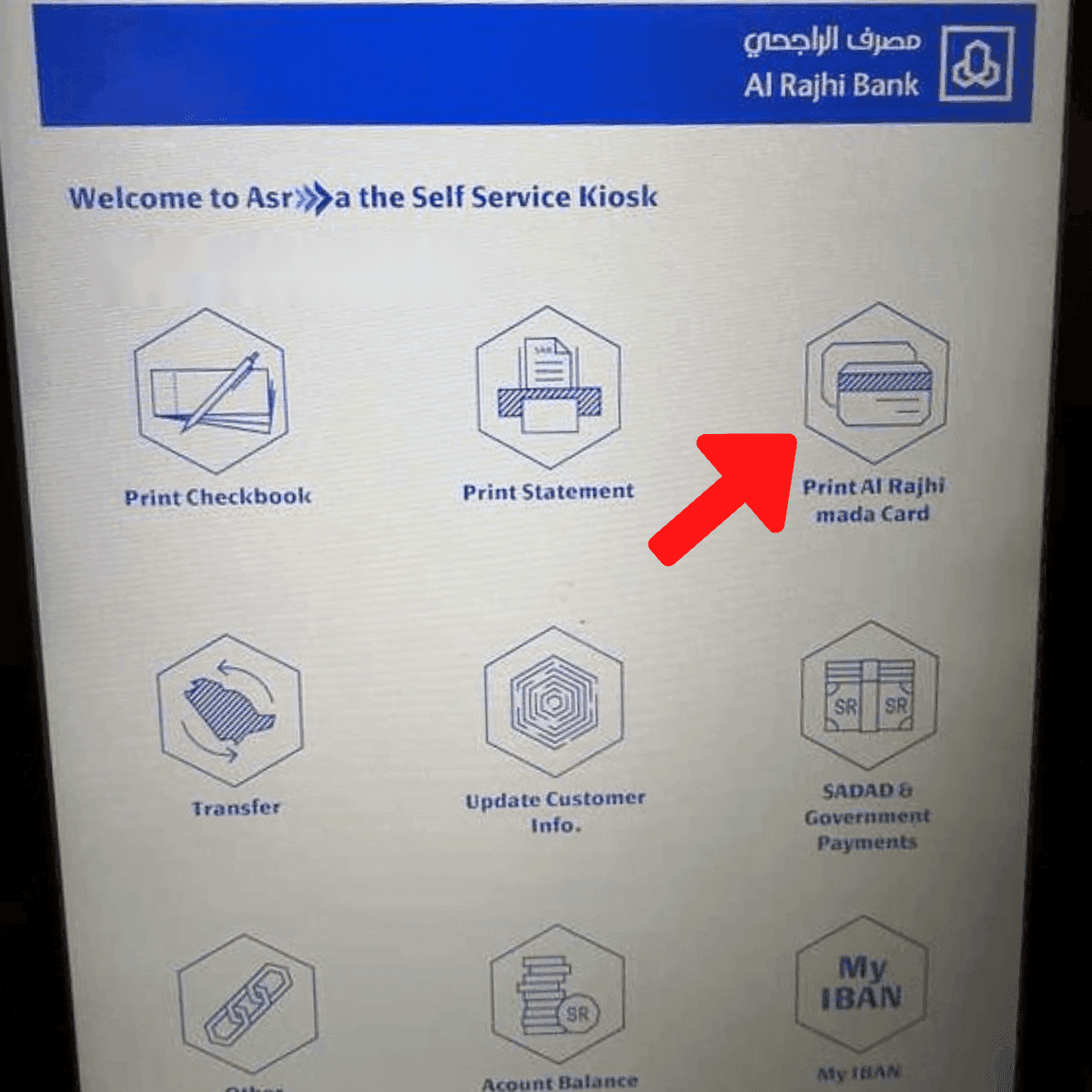
Next, you must go to an Al Rajhi Bank ATM to activate the new card and set up a new PIN number.
How to Activate New Al Rajhi Bank Mada Card through ATM
- Go to any Al Rajhi Bank ATM.
- Insert your new card.
- Select “English.”
- Enter your old Mada Card PIN.
- Choose any option like cash withdrawal.
- You will be prompted to enter a 4-digit secret code received on your registered mobile number. Enter it.
- Enter your new PIN. (It should be four digits.)
- Re-enter your new PIN.
Success! A message will display, “Your new ATM card is ready to be used with the PIN that you have just entered.”
More in this guide
- How to Add Your Credit/Debit Card to Apple Pay — Saudi Arabia is one of the few countries that Apple Pay can be used in. In this blog, we explain how to add your bank card to Apple Pay
- Al Rajhi Bank Credit Cards 2023 — From rewards programs to flexible repayment..
- Saudi Post's Awfar Service: Everything You Need to Know — Awfar is a service provided by Saudi Post for consumers who want their products delivered to their preferred address
- Best 10 Residential Compounds in Riyadh — Learn about the top compounds in the city, their features and amenities
- Best Credit Cards for Expatriates in Saudi Arabia 2026: Complete Guide — Compare top cards, eligibility requirements, benefits, and how to apply as an expat
- Best 10 Residential Compounds in Jeddah — Find Jeddah's top 5 residential compounds, offering a mix of luxury, comfort, and convenience for the perfect living experience in the city