How to Check How Many SIMs Are Linked to Your Iqama in 2026
Learn how to check how many sim cards are registered on your Iqama number through the official Mutasilportal using your iqama number.
Do you know how many SIM cards are currently registered under your Iqama? You can check them online in just a few steps and make sure all the numbers registered in your name belong to you.
An unknown SIM registered in your name could be misused for fraud, illegal activities, or unpaid bills, and you may be held responsible.
Option 1: Full Check (Recommended)
This method lets you check the mobile numbers registered under your Iqama through the CST’s Mutasil service.
Before you start, keep your Iqama number, date of birth, and one of your registered mobile numbers ready.
Follow these simple steps:
- Visit the official Mutasil Individuals portal (the CST’s SIM verification platform)
- Switch the language to English by selecting “ENGLISH“
- Enter your Iqama number in the “Person ID” field
- Add your date of birth in the “Birth Date” section
- When asked “Do you have mobile number?“, select “Yes” and enter one of your registered mobile numbers
- Click the “Inquire” button
- You’ll receive a verification code on the mobile number you provided – enter this code and click “Submit“
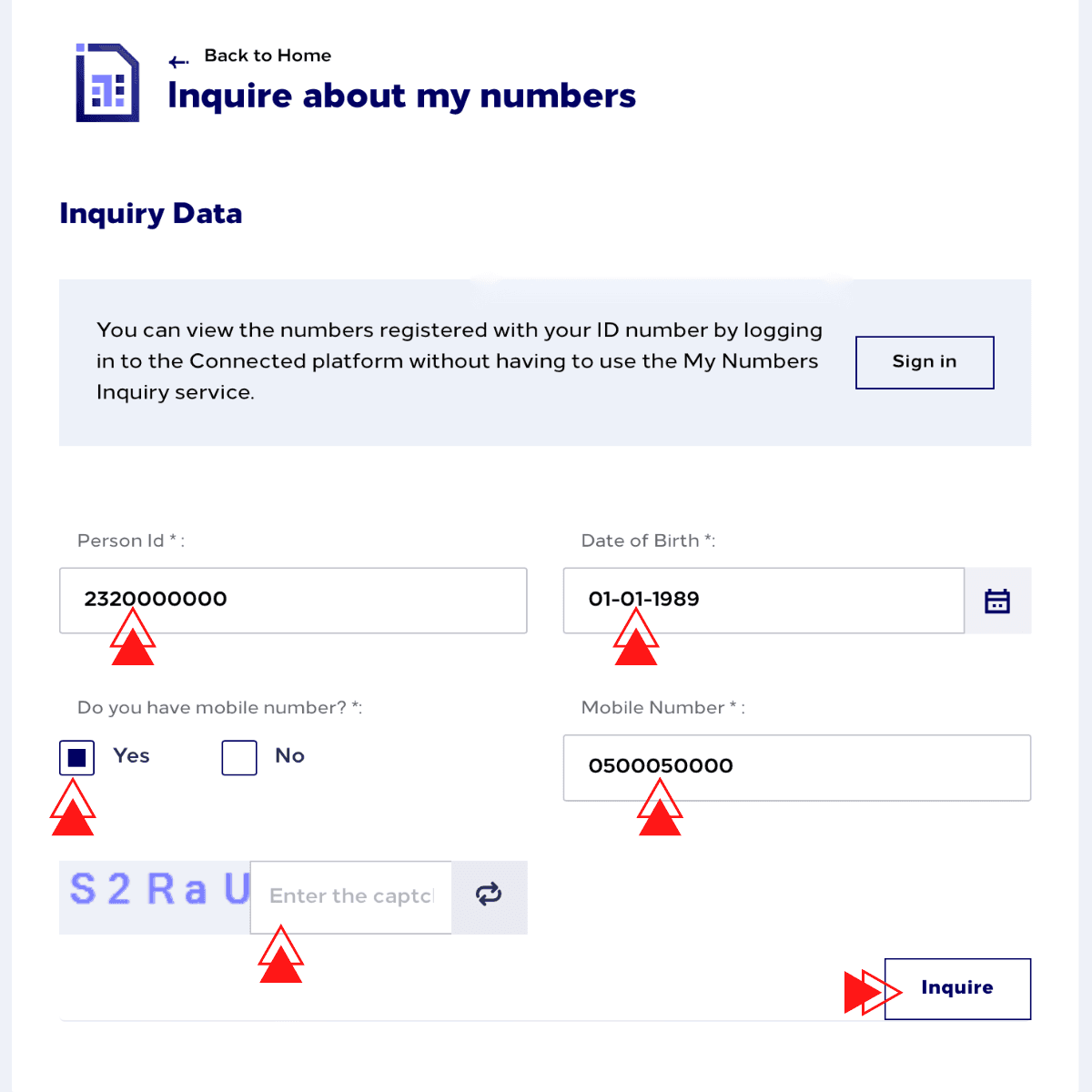
Once verified, you’ll see a detailed list showing all mobile numbers and data SIMs linked to your Iqama, including the complete phone numbers and their respective service providers. This gives you a clear picture of which numbers are registered with which telecom companies under your name.
Option 2: Basic Check (No Phone Needed)
If you don’t have access to any registered mobile numbers, you can still perform a basic check. While this method won’t show you the complete phone numbers, it will tell you how many SIMs are registered and with which networks.
Here’s how:
- Go to the same Mutasil Individuals portal
- Enter your Iqama number and date of birth
- Select “No” when asked about having a mobile number
- Click “Inquire“
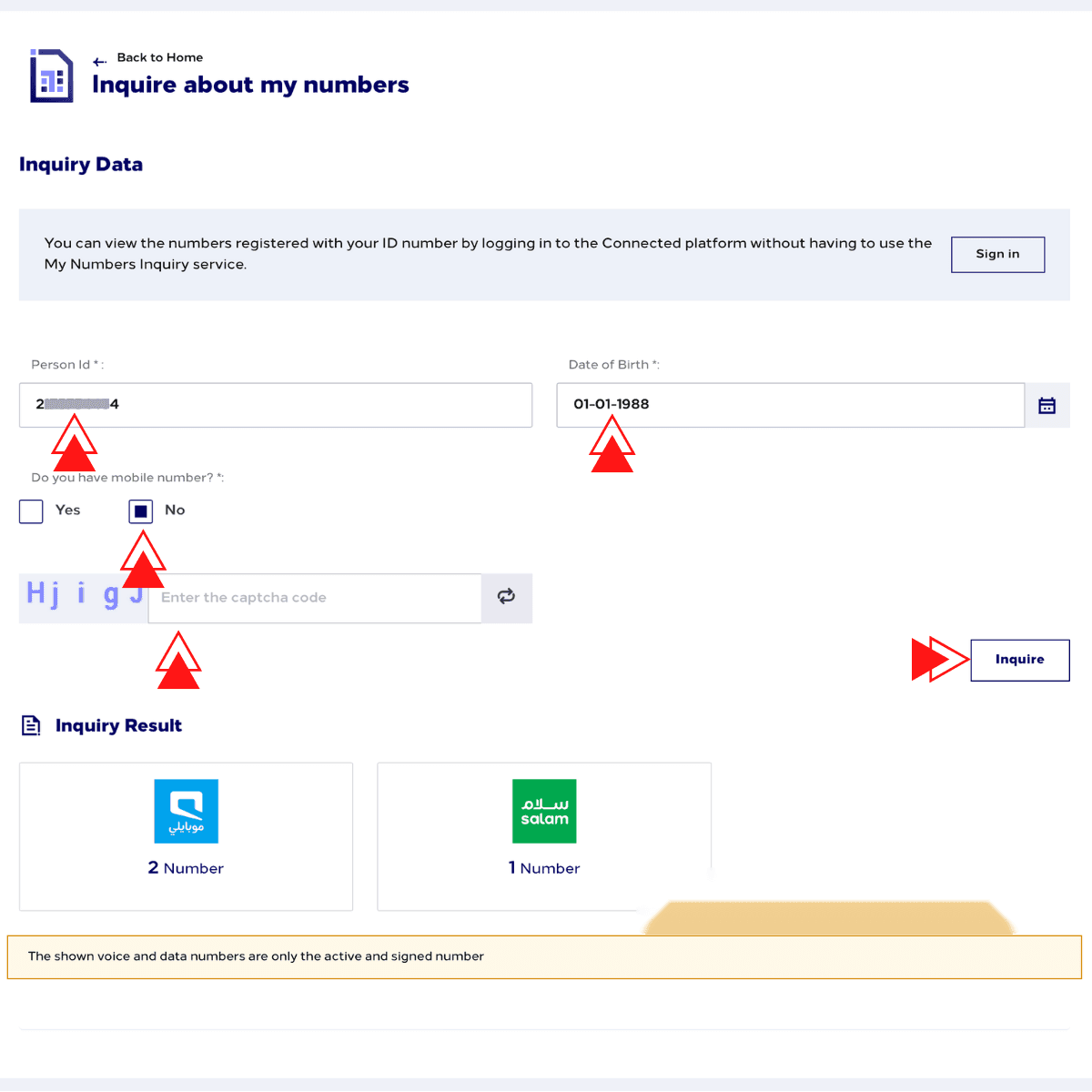
You’ll get a summary showing the total number of mobile connections registered under your name with each network provider.
Option 3: Use the CST App
The same verification is available through the official CST mobile app (available for both Android and iOS) via the ‘Argami’ feature. Simply download the app, create an account and log in to your account to view your registered mobile numbers.
Option 4: Tawakkalna App
You can also check your registered mobile numbers through the Tawakkalna app. Log in to your account and access the relevant telecom or mobile-number information to view the numbers associated with your identity.
What to Do If You Find Unauthorized Numbers
If you find a SIM registered under your Iqama that you don’t recognize, contact the mobile operator and ask them to cancel it.
You can contact the operators through their customer service numbers or visit a nearby branch:
- STC: Call 900
- Mobily: Call 1100
- Zain: Call 959
- Other providers: Contact them through their official website or customer service.
Keep your Iqama details ready when contacting the provider.
If the issue is not resolved, you can file a complaint with the CST through its official complaint service. After the number is removed, check again to make sure it is no longer registered under your Iqama.
More in this guide
- How Can You Get a Local Number on Your International SIM in KSA — Get a local number on your international SIM in Saudi with STC's easy service, making your stay connected and hassle-free
- APN Settings Saudi Arabia: STC, Mobily, Zain, Virgin & Lebara — Get Saudi APN settings for STC, Mobily, Zain, Virgin, Lebara, Friendi and other mobile networks to fix internet access
- Home Internet in Saudi Arabia 2026: Fiber vs 5G Packages & Prices Compared — Fiber & 5G plans from STC, Mobily, Zain, Go & Salam
- How to Check Your Saudi SIM Number Using USSD Codes — Find out how to retrieve your mobile number quickly
- How to Check Your Mobile SIM Number in Saudi Arabia — Learn how to quickly check your mobile SIM number in Saudi Arabia using USSD codes for all networks, including STC, Mobily, and Zain
- How to Check Mobily SIM & Data Balance — Whether using a code, an SMS, the Mobily app..