How To Issue A Final Exit Visa Through Absher
Here is step by step guide on how to issue a Final Exit Visa in Saudi Arabia through Absher platform. How to Request for Final Exit Visa?
Saudi Arabia now allows expatriate workers to issue final exit visas through the online portal Absher. To request a Final Exit Visa through Absher, you must not have any vehicles in your Iqama. Following is the procedure for issuing a final exit visa through Absher.
How to Request a Final Exit Visa through Absher?
- Visit the Absher portal: https://absher.sa/
- Log in with your username and password
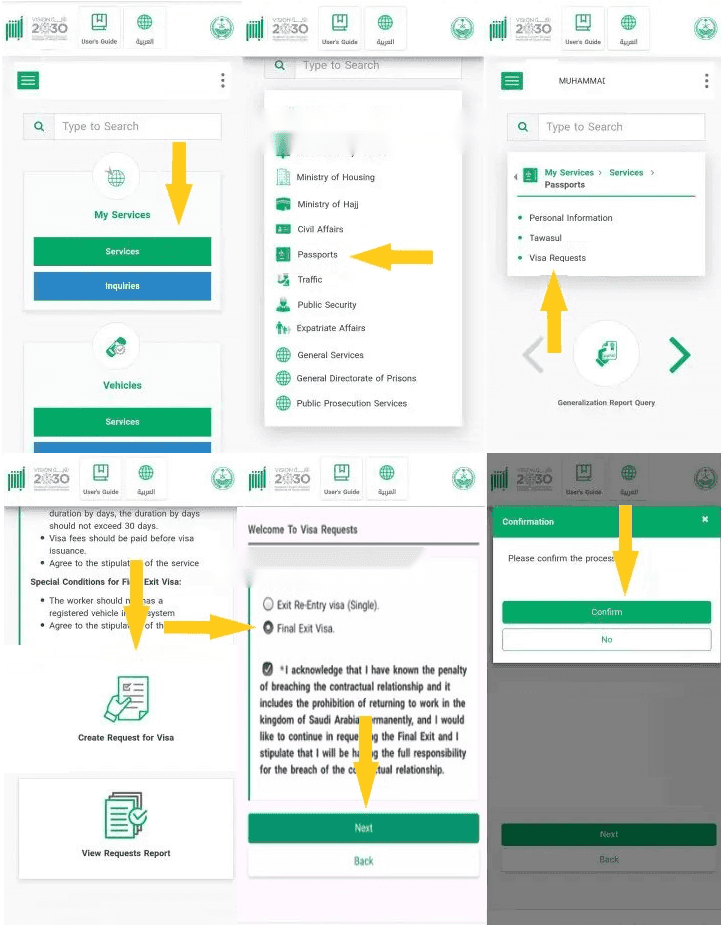
- Click on “Services” under the “My Services” tab
- Select “Passports” from the list of services
- Choose “Visa Services“
- Click on “Create Request for Visa“
- Choose “Final Exit Visa
- Click on “Next“
- Click on “Confirm” to submit the application
Read: Jawazat links payment of due bills with the issuance of final exit visas
Once you have successfully submitted your application, your employer will have ten days to inquire about your request for a final exit visa. In the absence of a response from your employer, you can issue a final exit visa with 15-day validity. Also Read: How to issue Exit Re-Entry Visas through Absher
More in this guide
- Jawazat clarifies procedure to renew expired final exit visa — Avoid penalties and ensure valid Iqama status
- Jawazat: Final Exit Visa Requires 30-Day Iqama Validity — Learn the key rules for issuing the visa
- Saudi Arabia Executes 4 Expats in Murder and Drug Smuggling Cases — Saudi Arabia executed four expats in separate murder and drug smuggling cases in Makkah and Asir
- Al Rajhi Mobile Registration: Your Complete Guide — Learn how to activate the app
- How to Register for Al Rajhi Phone Banking for the First Time — How to register in Al Rajhi phone banking and what is the Al Rajhi phone banking number and what are the features of this service
- Saudi Tourist Visa: Everything You Need to Know — Plan your trip now!