How to Update Iqama in SNB-Alahli Bank Online
Learn how to update Iqama in SNB Alahli Bank using the SNB Mobile app in a few simple steps to avoid any disruptions to your banking services
Update Iqama on SNB Alahli online
Are you looking to update your Iqama information on the SNB Alahli Bank after recently renewing it? Keeping your Iqama information up to date is important to keep your account is active and operational. The good news is that the SNB Alahli Bank app makes the process easy. In this article, we’ll take you through the simple step-by-step process.
Updating Renewed Iqama Info on SNB Alahli App: Step-by-Step Guide
Updating your renewed Iqama information on SNB Alahli Bank is simple and can be done through a number of channels, including the mobile app, online banking, or a visit to a branch. To update your information through the mobile app, follow the steps below;
- Download the SNB Mobile app.
- Log in to the app using your username and password.
- Once logged in, click on the menu option in the bottom right corner of the main page.
- Select “Personal Info” from the options available
- Select “ID Expiry/Update“
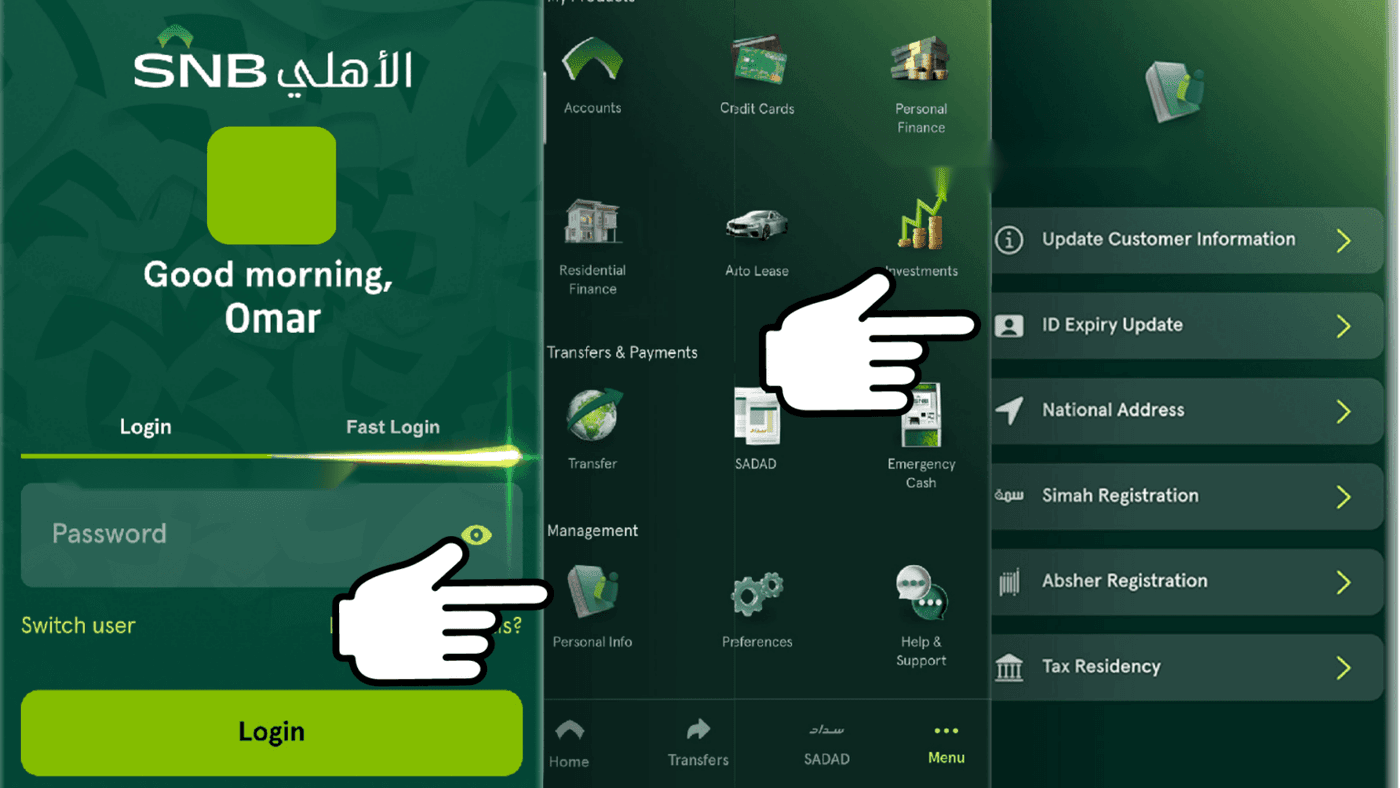
- View your ID number and information, and click on the button “Update ID Expiry” at the bottom.
- The system will sync your latest Iqama information from the government database and display the updated information.
- Verify the information and click on the “Confirm” button.
- Your Renewed Iqama information is now successfully updated with the bank.
Also Read: How to Check your Iqama Expiry Date Online
What happens if I don’t update my ID information?
Updating your renewed Iqama information on the bank is crucial, as failure to do so may result in your account being frozen. The bank usually sends a text message reminder prior to the expiration date of your ID.
How to Reactivate a Frozen SNB Alahli Bank Account
If you fail to update your Iqama information on the bank and the expiration date has passed, your account may become frozen. It will prevent you from performing transactions or withdrawing your funds. To reactivate your account, follow the steps outlined above to update your Iqama information. Once the information is successfully updated, your account will be reactivated instantly.
Conclusion
In conclusion, updating your renewed Iqama information on the SNB Alahli Bank is a simple and straightforward process that can be done through the bank’s mobile app. By following the steps outlined in this article, you can ensure that your account stays active and in good standing. It is important to regularly update your Iqama information to avoid any disruptions to your banking services. If your account becomes frozen, you can easily reactivate it by updating your Iqama information through the SNB Alahli Bank app. So, take a few minutes to complete this important task and enjoy seamless banking services.
More in this guide
- How to Add Your Credit/Debit Card to Apple Pay — Saudi Arabia is one of the few countries that Apple Pay can be used in. In this blog, we explain how to add your bank card to Apple Pay
- Al Rajhi Bank Mada Card: How to Renew and Print at Kiosk — This article explains how to renew and print your Al Rahji Bank ATM card (mada card) through a self-service kiosk without visiting the branch
- Al Rajhi Bank Credit Cards 2023 — From rewards programs to flexible repayment..
- Saudi Post's Awfar Service: Everything You Need to Know — Awfar is a service provided by Saudi Post for consumers who want their products delivered to their preferred address
- Best 10 Residential Compounds in Riyadh — Learn about the top compounds in the city, their features and amenities
- Best Credit Cards for Expatriates in Saudi Arabia 2026: Complete Guide — Compare top cards, eligibility requirements, benefits, and how to apply as an expat