How to Obtain and Activate an STC eSIM
How to obtain and activate STC eSIM on your smart device in Saudi Arabia. Cost of STC eSIM. Convert existing SIM to eSIM. Order through MySTC
What is an eSIM
An eSIM is a digital sim embedded in a mobile device. With this, activating a postpaid or prepaid plan is possible without needing a physical SIM card. In 2020, the Saudi Telecom Company (STC) began offering electronic SIM cards to its customers in Saudi Arabia. This article will walk you through the steps required to obtain and activate an STC eSIM in Saudi Arabia.
How do I get an STC eSIM?
You can obtain an eSIM from STC via the MySTC app, by visiting an STC sales office in the Kingdom, or via the MySTC portal.
What is the cost of an STC eSIM?
The cost of upgrading from a normal SIM to an eSIM is 57.5 SR for a postpaid number and 28.75 SR for a prepaid number, including VAT.
Also Read: How to check how many SIM cards are registered on your iqama number
How to order an eSIM through the MySTC App
- Enter the store in the app
- Click on “get a new number“
- Select your SIM card type (prepaid or postpaid)
- Select the suitable plan
- Choose “Use eSIM” and complete the steps
Converting your Normal SIM Card to an eSIM through MySTC App
- Select “Manage” on the app homepage
- Click on the SIM icon at the top of the page
- Select your SIM
- Click on “Replace SIM”
- Select “Use eSIM” and complete the steps
How to Activate your STC eSIM
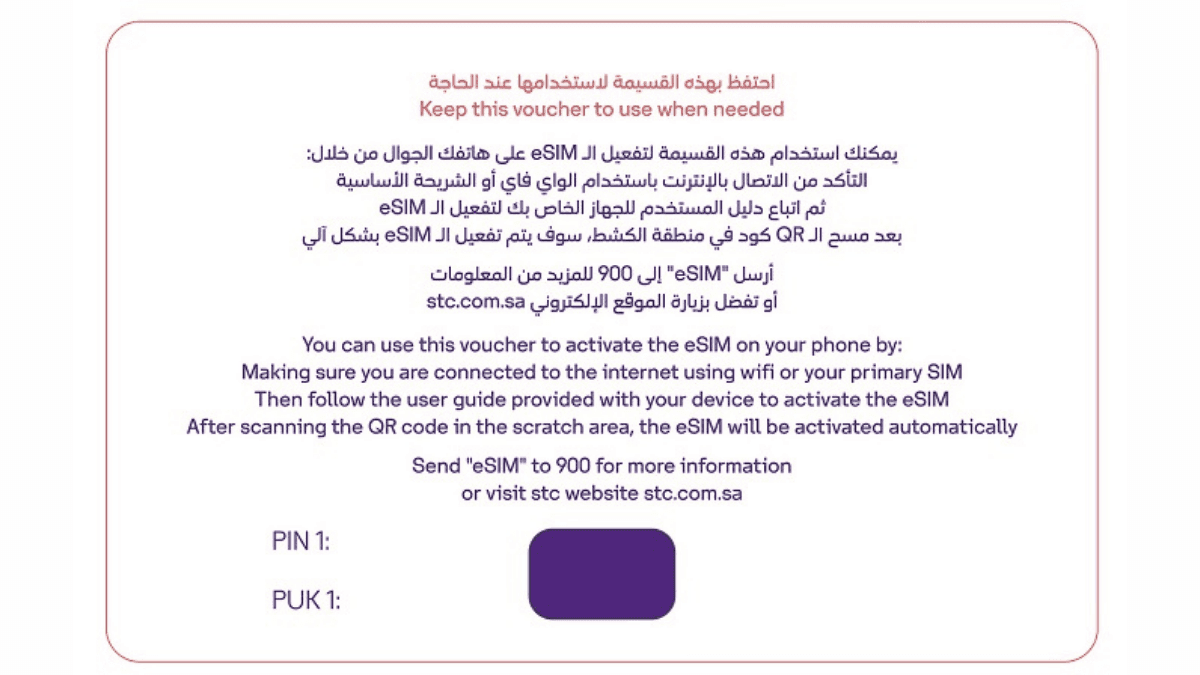
- Scratch the QR code in the voucher
- Connect the device to the internet. (Either via WiFi or the internet of the normal SIM in the device).
- Follow the user guide provided with your device to activate the eSIM.
- Upon scanning the QR code in the scratch area, the eSIM will be activated automatically.
Also Read: How to port your mobile number to another network in Saudi Arabia
After activating the eSIM on the device, it cannot be used on another device, and if the device is changed, a new eSIM replacement is required, as the eSIM will not work on a different device after activating the original one.
More in this guide
- How to Add Your Credit/Debit Card to Apple Pay — Saudi Arabia is one of the few countries that Apple Pay can be used in. In this blog, we explain how to add your bank card to Apple Pay
- Al Rajhi Bank Mada Card: How to Renew and Print at Kiosk — This article explains how to renew and print your Al Rahji Bank ATM card (mada card) through a self-service kiosk without visiting the branch
- Al Rajhi Bank Credit Cards 2023 — From rewards programs to flexible repayment..
- Saudi Post's Awfar Service: Everything You Need to Know — Awfar is a service provided by Saudi Post for consumers who want their products delivered to their preferred address
- Best 10 Residential Compounds in Riyadh — Learn about the top compounds in the city, their features and amenities
- Best Credit Cards for Expatriates in Saudi Arabia 2026: Complete Guide — Compare top cards, eligibility requirements, benefits, and how to apply as an expat