Naqal Maloomat: How to Update Your Passport in Absher
Read this article to learn how to update passport in absher (naqal maloomat) in a few easy steps without the need to visit the Jawazat.
Naqal Maloomat
Naqal Maloomat is a term generally used for updating renewed passport information on the Jawazat system in Saudi Arabia. Previously, it was necessary to visit the Jawazat office in person to perform this update. However, now it can be done online through the Absher platform. Using this online method, both workers and their dependents can update their passport information, and the process is detailedly explained in this article.
Conditions for Updating Passport Information on Absher
- Your passport information can only be updated through Absher once every five years.
- Previous passport with more than 12 months of validity remaining cannot be updated on Absher.
- If you have outstanding traffic fines, you need to settle them first, to perform your naqal maloomat.
Absher Passport Update Guidelines for Various Categories
Here are the guidelines for updating passport information on Absher for different categories.
- Foreign investors can update their passport details on Absher by themselves.
- Foreign workers need their Sponsor or Authorized Agent to update their passport details through Absher.
- Dependents of expatriate workers (family members) can have their passport information updated by the head of household (father or husband) on Absher.
Also Read: How to Pay Exit Re-Entry Visa Fee in Saudi Arabia
How to Update New Passport in Absher (Naqal Maloomat Procedure)
You can update your passport information on Absher using either the Absher app or the Absher portal. Here are the steps to follow if you choose to update your passport information through the Absher portal.
- Go to the Absher portal: https://absher.sa/
- Select “Individuals”.
- Select English from the top of the page.
- Log in with your username and password
- Go to eServices > Passports > Update Resident Passport Information
- Select the individual’s name.
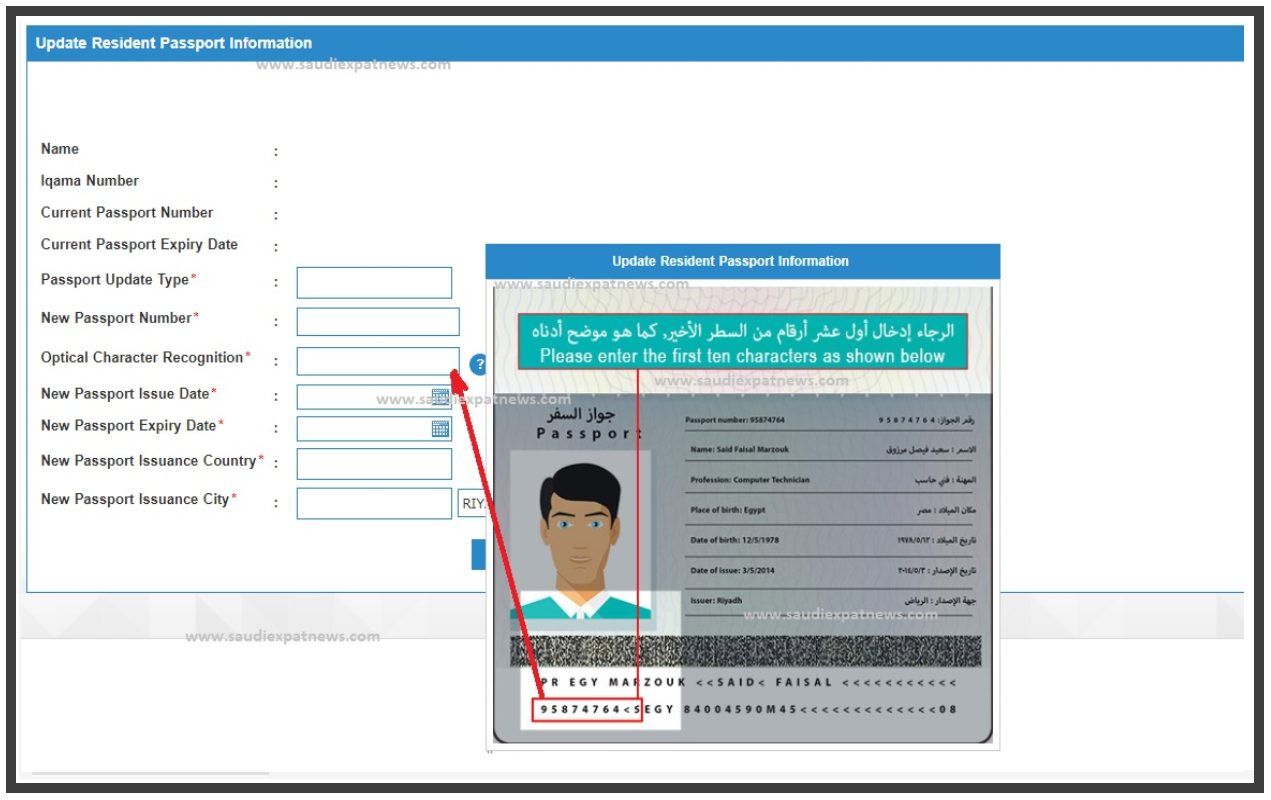
Then enter the following details
- Passport Update Type
- New Passport Number
- Optical Character Recognition (see above screenshot)
- New Passport Issue Date
- New Passport Expiry Date
- New Passport Issuance Country
- New Passport Issuance City
Once you enter all the above information, click the “Submit” button.
That’s it! Once the update process is complete, your updated passport information will appear in your profile on the Absher website.
More in this guide
- See the Updated List of Absher Machine Locations — The following is a complete list of Absher machine locations in KSA
- How to Book a Jawazat Appointment Online in Saudi Arabia — Step-by-step guide to scheduling your visit for passport services
- How to Change Absher Mobile Number Using Nafath App — Learn how to update or update your Absher mobile number easily with the Nafath app in this quick step by step guide
- Hajj 2026 Registration Open for Saudi Citizens & Residents — Packages open from 15 Ramadan
- 3 Ways to Update Your Mobile Number in Absher — Learn the latest ways to change your Absher mobile number using the Absher app, Nafath app, or an Absher Self-Service Kiosk in Saudi Arabia
- How to Easily Refund Unused Iqama Funds — Learn how to quickly refund your unused Iqama funds for absher services through ATM, internet, or mobile banking