How to Change Absher Mobile Number Using Nafath App
Learn how to update or update your Absher mobile number easily with the Nafath app in this quick step by step guide.
We all know that Absher is an important e-service portal in Saudi Arabia, and it’s a mandatory requirement for accessing most government services. If you need to update your registered mobile number with Absher, you can do so by following the steps in this article. Here’s the good news: You can now use the Nafath App to update your Absher mobile number without the need to visit the Absher kiosk. We’ll guide you through the process in this article.
Steps to Change Your Absher Mobile Number Using the Nafath App
Nafath is a mobile application introduced by the Saudi government, offering unified central access to all service providers while verifying the user’s identity. What makes it even better is that you can update your mobile number in Absher using the Nafath app without needing app registration. Here’s how:
- Download Nafath App:
- Visit the Apple App Store or Google Play.
- Download the Nafath App to your mobile device.
- Open the App and Set the Language to English:
- After installation, open the Nafath App.
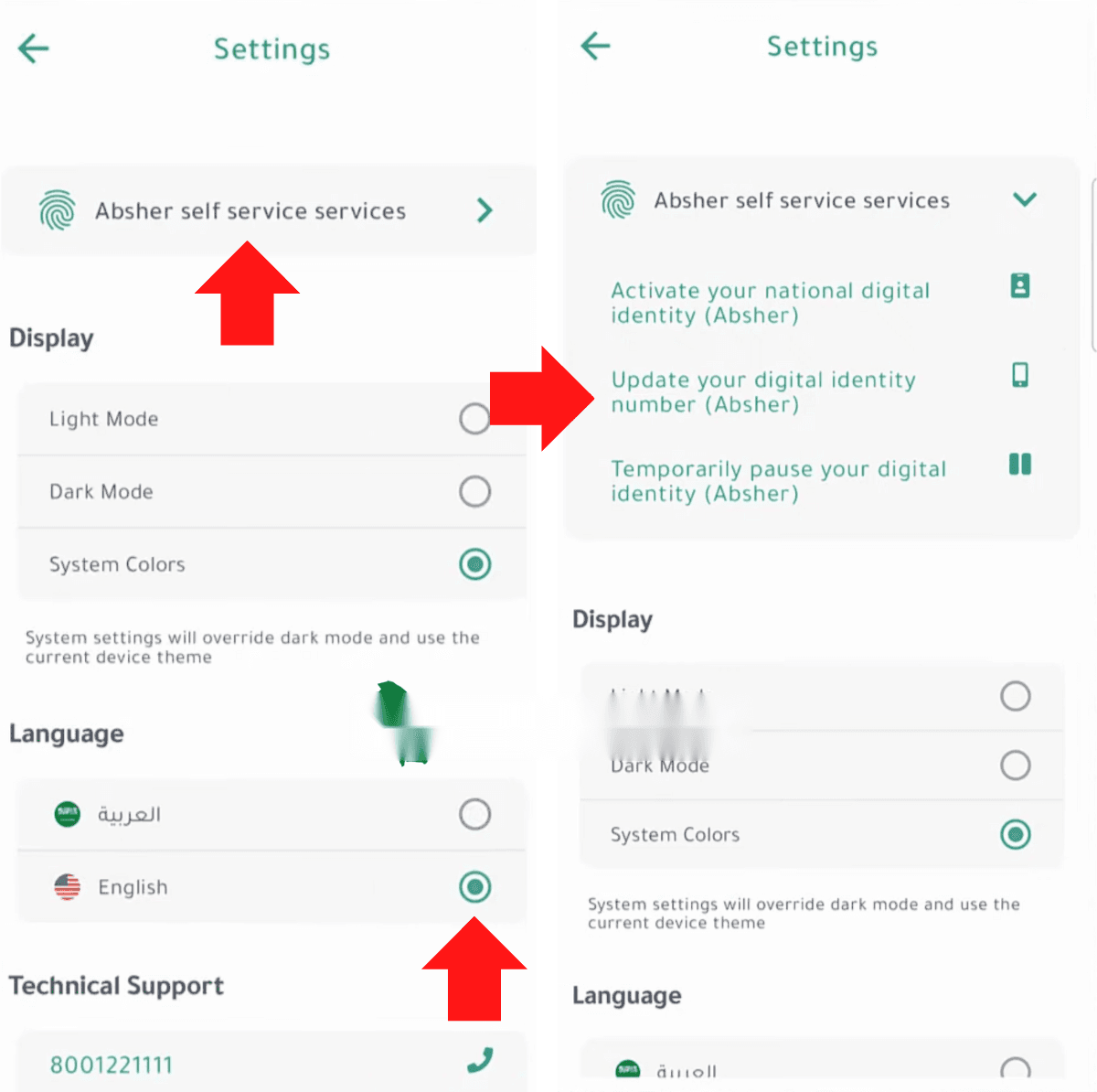
- Navigate to the settings menu and select “English” as your language preference.
- Access Absher Self-Service Devices Services:
- In the settings page, find the option labelled “Absher self-service devices services.”
- Select this option to proceed.
- Choose “Update Your Digital Identity Number (Absher)”:
- Within the Absher self-service devices services, locate and select the “Update your digital identity number (Absher)” option.
- Enter Your Iqama Number:
- You will be prompted to enter your Iqama number.
- Enter the required information and click on the “Next” button.
- Enter Your New Mobile Number:
- Input your new mobile number (e.g., 552576543) and click on “Next.”
- Receive and Enter the Activation Code:
- You will receive an activation code on your new mobile number.
- Enter the code as instructed to proceed.
- Fingerprint Verification:
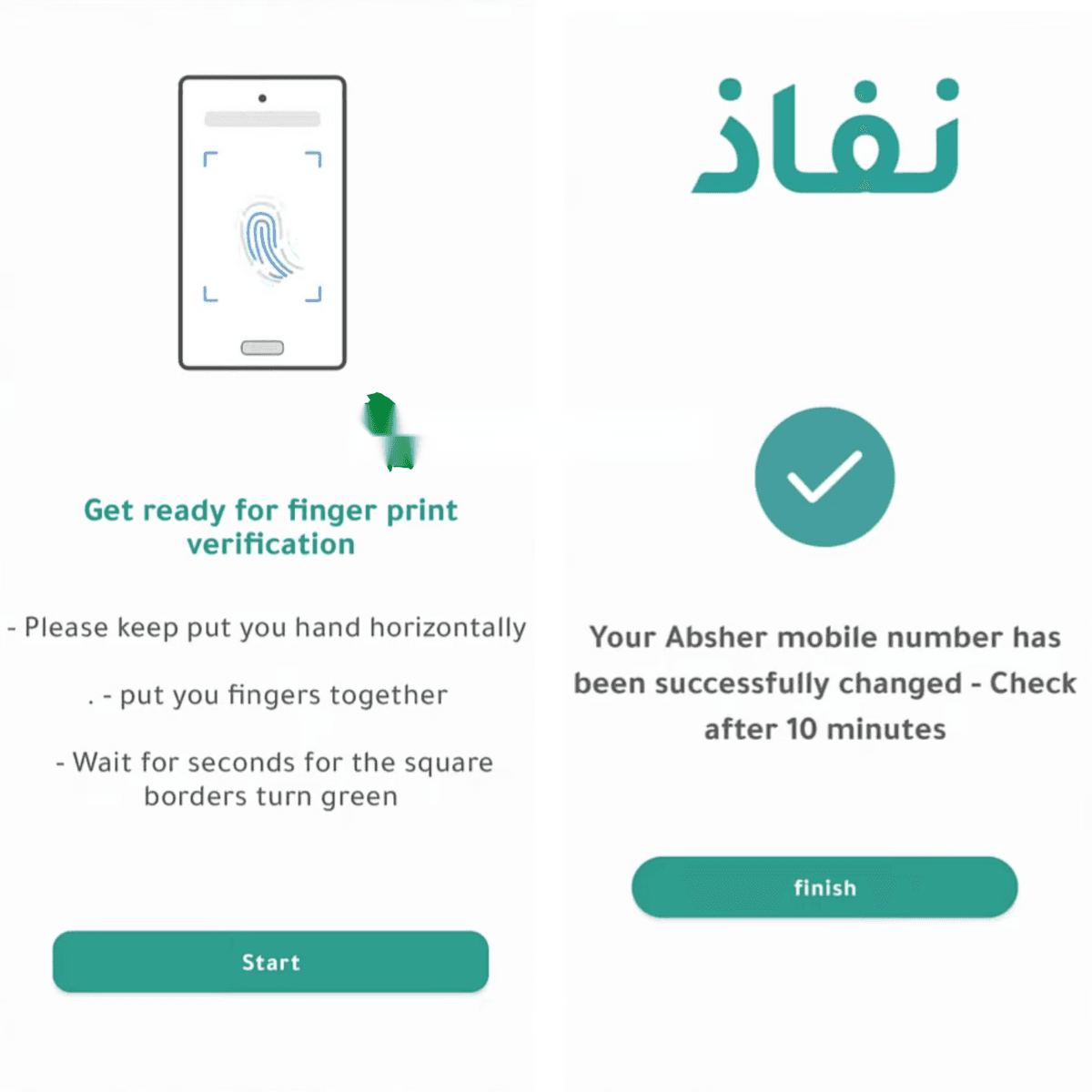
- You will see a message that reads, “Get ready for your fingerprint verification.”
- Follow the on-screen instructions to scan all four fingers of your left hand using your mobile camera.
- Click on the “Start” button to initiate the verification process.
- Place your left hand on a plain surface and ensure that the camera captures all four fingers (excluding the thumb).
- The app will quickly verify your fingerprints, usually completed in seconds.
- If the verification fails, try adjusting the camera focus or the distance between your fingers and the camera.
- Confirmation:
- Once the verification is completed, you will receive a message confirming that your Absher mobile number has been changed.
- You may need to wait for approximately 10 minutes for the changes to take effect.
In conclusion, updating your mobile number in Absher has never been easier. With the Nafath App, you can do this task easily and conveniently, without the need to visit an Absher kiosk. By following these simple steps, you ensure that your Absher account remains up-to-date, allowing you to continue accessing the essential government services you rely on in Saudi Arabia. We hope this guide helps.
More in this guide
- See the Updated List of Absher Machine Locations — The following is a complete list of Absher machine locations in KSA
- How to Book a Jawazat Appointment Online in Saudi Arabia — Step-by-step guide to scheduling your visit for passport services
- Hajj 2026 Registration Open for Saudi Citizens & Residents — Packages open from 15 Ramadan
- 3 Ways to Update Your Mobile Number in Absher — Learn the latest ways to change your Absher mobile number using the Absher app, Nafath app, or an Absher Self-Service Kiosk in Saudi Arabia
- How to Easily Refund Unused Iqama Funds — Learn how to quickly refund your unused Iqama funds for absher services through ATM, internet, or mobile banking
- How to Register and Activate Your Absher Account: 2026 Guide — It covers everything you need to know about the Absher