How to Reset Sehhaty App Password
Resetting your Sehhaty app password is a simple process, but it can be a little tricky for many to find the right option to do so.
Resetting your Sehhaty app password is a simple process, but it can be a little tricky for many to find the right option to do so. This post explains how to reset your Sehhaty app password.
Steps to Reset Sehhaty App Password
Install the Sehhaty app from Google Play or Apple App Store.
Open the Sehhaty app.
Select the “Sign in” option.
Click on the “Forgot Password” link just below the username and password options to reset your password.
Enter your Iqama number then click on the “Next” button.
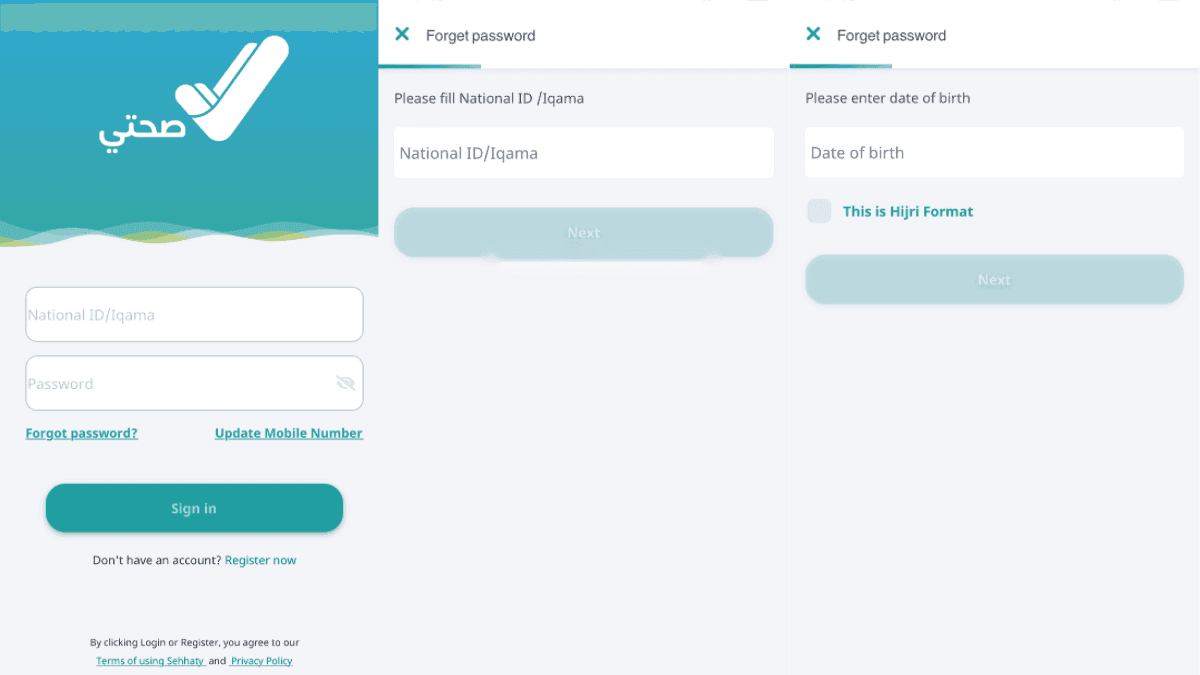
On the next step, enter your date of birth and click on the “Next” button.
You will receive an SMS with a verification code in your registered mobile number. Enter it into the app for verification.
Next, enter a new password.
Please note the password must contain at least 8 characters, including one uppercase and a numeric character.
Confirm the password and click on “Continue.”
You have successfully changed your Sehhaty app password.
More in this guide
- How Can You Get a Local Number on Your International SIM in KSA — Get a local number on your international SIM in Saudi with STC's easy service, making your stay connected and hassle-free
- APN Settings Saudi Arabia: STC, Mobily, Zain, Virgin & Lebara — Get Saudi APN settings for STC, Mobily, Zain, Virgin, Lebara, Friendi and other mobile networks to fix internet access
- Home Internet in Saudi Arabia 2026: Fiber vs 5G Packages & Prices Compared — Fiber & 5G plans from STC, Mobily, Zain, Go & Salam
- How to Check How Many SIMs Are Linked to Your Iqama in 2026 — Learn how to check how many sim cards are registered on your Iqama number through the official Mutasilportal using your iqama number
- How to Check Your Saudi SIM Number Using USSD Codes — Find out how to retrieve your mobile number quickly
- How to Check Your Mobile SIM Number in Saudi Arabia — Learn how to quickly check your mobile SIM number in Saudi Arabia using USSD codes for all networks, including STC, Mobily, and Zain