How to lock your Facebook profile for privacy
Learn how to lock your Facebook profile in this helpful article and ensure that you only share information with those who you want to see it!
Facebook gives you the option of locking your profile. This is a great way to make sure that only your friends can view your posts. By doing this your photos, stories, and full-sized profile pictures will be only available to people on your friend list. After locking your profile, only a portion of your information will be visible to people who don’t have your permission. Learn how to lock your Facebook profile in this helpful article and ensure that you only share information with those who you want to see it.
How to Lock Facebook Profile via Mobile App
To lock your Facebook profile via the Android/IOS app follow these steps:
- Open Facebook app and tap on your profile.
- Tap the three-dot menu icon next to “Add to Story”.
- Tap the Lock Profile option.
- On the next page, scroll down and select “Lock Your Profile” option.
- Your Facebook profile is now locked.
How to Lock Facebook Profile via Desktop
Here’s how to lock your Facebook profile using a desktop browser.
- Go to https://www.facebook.com/
- Select your profile icon.
- This will take you to your profile page.
- You should see a three dot menu next to Edit Profile.
- Click on three dot menu and select Lock Profile option.
- Click on “Lock Your Profile.”
- Your profile is now locked.
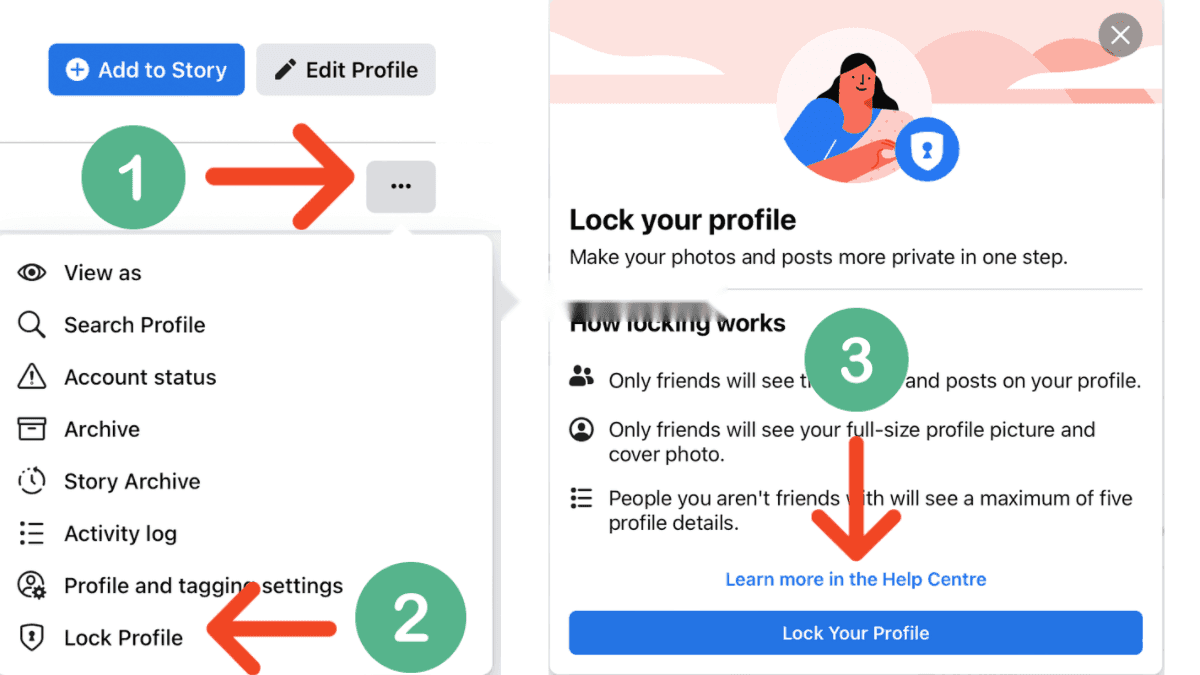
You can unlock your Facebook profile at any time. Just visit your profile and tap the three dots menu. Then, click the unlock icon.
More in this guide
- How Can You Get a Local Number on Your International SIM in KSA — Get a local number on your international SIM in Saudi with STC's easy service, making your stay connected and hassle-free
- APN Settings Saudi Arabia: STC, Mobily, Zain, Virgin & Lebara — Get Saudi APN settings for STC, Mobily, Zain, Virgin, Lebara, Friendi and other mobile networks to fix internet access
- Home Internet in Saudi Arabia 2026: Fiber vs 5G Packages & Prices Compared — Fiber & 5G plans from STC, Mobily, Zain, Go & Salam
- How to Check How Many SIMs Are Linked to Your Iqama in 2026 — Learn how to check how many sim cards are registered on your Iqama number through the official Mutasilportal using your iqama number
- How to Check Your Saudi SIM Number Using USSD Codes — Find out how to retrieve your mobile number quickly
- How to Check Your Mobile SIM Number in Saudi Arabia — Learn how to quickly check your mobile SIM number in Saudi Arabia using USSD codes for all networks, including STC, Mobily, and Zain