How To Transfer Money From STC Pay To An International Bank Account
STC Pay International Bank Transfer: This article explains how you can transfer money from STC Pay to an international bank account.
STC Pay is the digital payment arm of STC (Saudi Telecom Company), the largest telco operator in the Kingdom. STC Pay is a leading digital wallet service in Saudi Arabia. This article will walk you through how to transfer money from STC Pay to an international bank account.
STC Pay Money Transfer to International Bank Account
The steps to transfer money from STC Pay to an international bank account are as follows.
How to add a new International Bank Account in STC Pay
To transfer funds from STC Pay to an international bank account, you should first add a receiver bank account. Here’s how to add a foreign bank account to STC pay.
Download STC Pay app.
Sign in to STC Pay.
Select “International Transfer.”
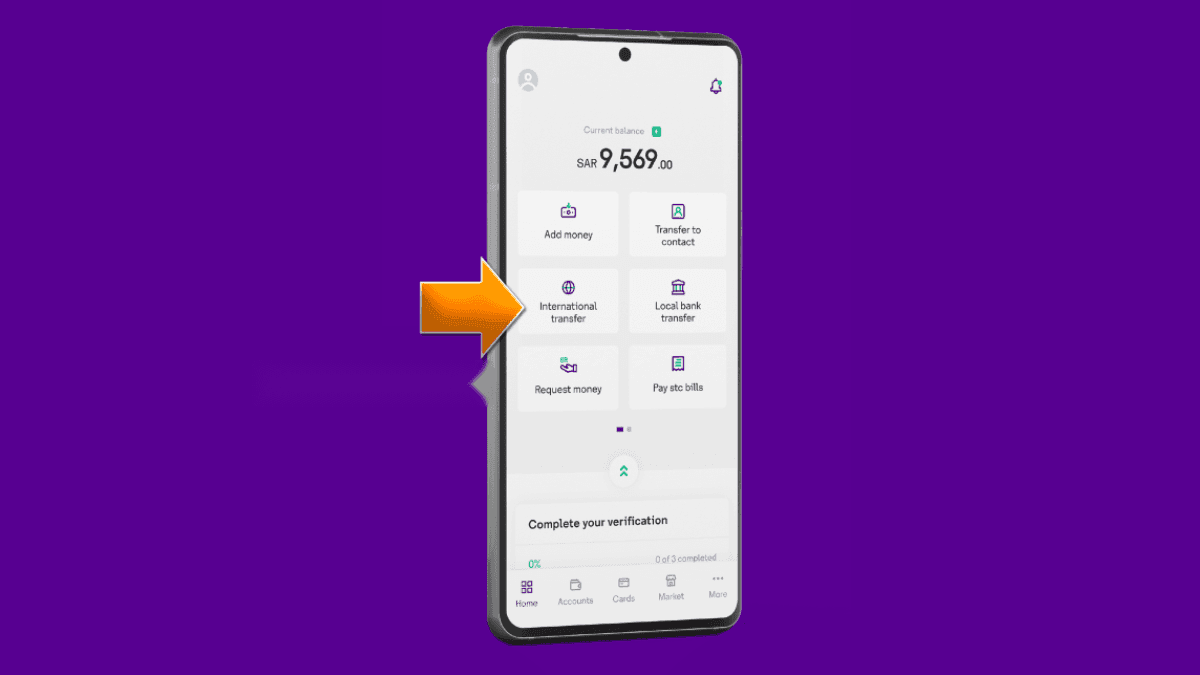
Click on “Add New Receiver.”
- Ente the Full Name of account holder.
- Select the Relationship of account holder with you.
- Select “Country and Region.”
- Select a delivery option: Western Union Cash Pickup or Transfer to a Bank Account or Transfer to a Mobile Wallet.
Click on “Continue.”
- On the new page, select “Bank Name.”
- Enter the Bank Account Number.
- Enter the IFSC Code (for Indian bank accounts only).
- Select the reason for the transfer. (E.g., education, family support, saving, gifts)
- Choose the sender’s relationship with the receiver. (E.g., father, wife, brother, friend)
Click on “Continue.”
- On the next page, select the receiver’s nationality and age. (If you are unsure about the age, select no.)
Click on “Continue.”
- Enter the verification code.
You have now successfully added the receiver. Now you can send money.
Also Read: STC Credit Transfer Service: How to Use
How to Transfer Money to an International Bank Account
- Log in to the STC Pay
- Select “International Transfer.”
- On the next page, you will see a list of added receivers.
- Select the receiver and click on “Transfer Money.”
- Enter the amount in Saudi Riyal or Local Currency.
- Select the “Purpose of Transfer.”
- Enter the promotion code (optional)
- Click on “Continue.”
- On the next page, review the transfer details and click on “Confirm.”
- Click on “I Agree” at the bottom of the declaration page.
You have now successfully completed the transfer of funds to the international bank. Congratulations!!
More in this guide
- How to Add Your Credit/Debit Card to Apple Pay — Saudi Arabia is one of the few countries that Apple Pay can be used in. In this blog, we explain how to add your bank card to Apple Pay
- Al Rajhi Bank Mada Card: How to Renew and Print at Kiosk — This article explains how to renew and print your Al Rahji Bank ATM card (mada card) through a self-service kiosk without visiting the branch
- Al Rajhi Bank Credit Cards 2023 — From rewards programs to flexible repayment..
- Saudi Post's Awfar Service: Everything You Need to Know — Awfar is a service provided by Saudi Post for consumers who want their products delivered to their preferred address
- Best 10 Residential Compounds in Riyadh — Learn about the top compounds in the city, their features and amenities
- Best Credit Cards for Expatriates in Saudi Arabia 2026: Complete Guide — Compare top cards, eligibility requirements, benefits, and how to apply as an expat