How To Update Iqama On Riyad Bank App
Learn how to easily update your Iqama information on your Riyad Bank account through the Riyad Bank Mobile app.
If you live in Saudi Arabia, you know it’s important to keep your Iqama valid to access various services and benefits. After renewing your Iqama, you need to update your bank accounts to keep your accounts active. If you have an account with Riyadh Bank and want to update your Iqama information, you can easily do so through the Riyad Bank Mobile app. In this article, we’ll walk you through the process of updating your Iqama on your Riyadh Bank account using the Mobile app. This is a quick and convenient way to ensure that your bank account stays active and that you can continue to use it without any issues.
How to Update Iqama in Riyad Bank
Updating the validity of your Iqama on your Riyad Bank account is easy to do through the Riyad Bank Mobile app. Here’s how:
- Download the Riyad Bank Mobile app.
- Log in to the app.
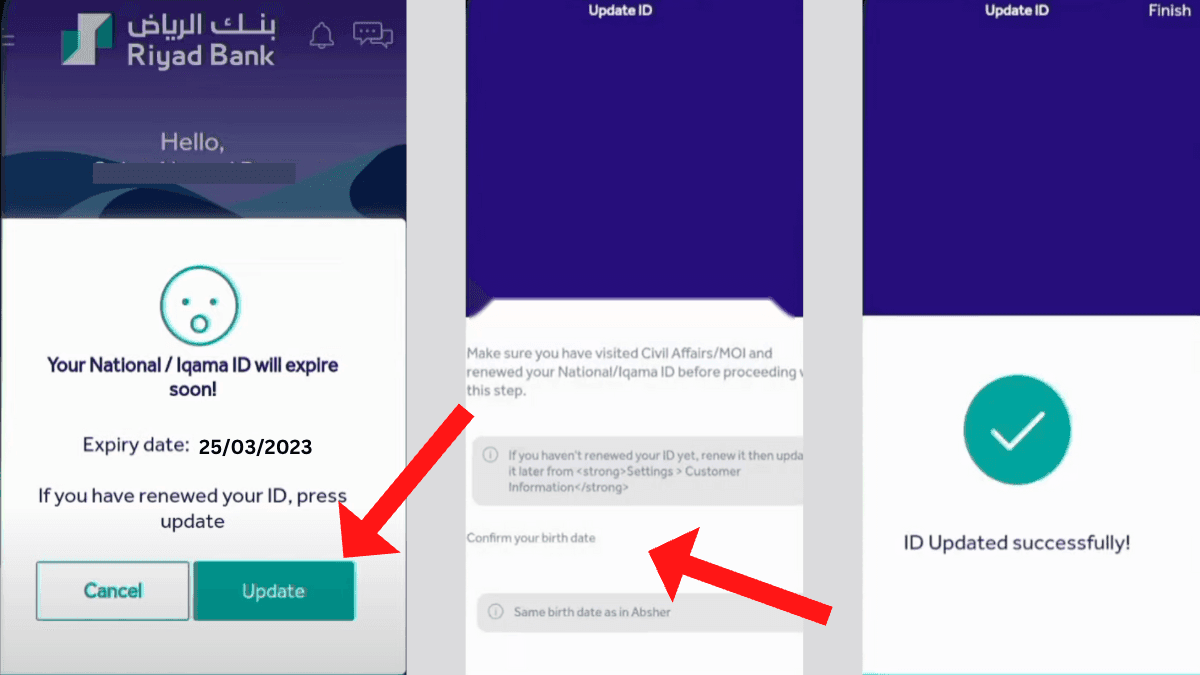
- If your Iqama is about to expire or has already expired, you will receive a notification prompting you to update your ID information.
- Click on the “Update” button.
- On the next page, enter your date of birth (as it appears in Absher) and click on the “Update” button.
- The system will then match your Iqama information with Absher and update it.
- If the verification is successful, you will see a message on your screen saying, “ID Updated Successfully.”
Conclusion
Updating your Iqama on your Riyad Bank account through the Mobile app is quick and convenient. Follow the steps in this article to easily update your Iqama and continue using your bank account without issues. Remember, keeping your Iqama valid is important for accessing services and benefits in Saudi Arabia. Updating it with your bank account is just one aspect of maintaining it. Use the Riyad Bank Mobile app to take care of this important task and ensure that your Iqama and bank account are in good standing.
More in this guide
- How to Add Your Credit/Debit Card to Apple Pay — Saudi Arabia is one of the few countries that Apple Pay can be used in. In this blog, we explain how to add your bank card to Apple Pay
- Al Rajhi Bank Mada Card: How to Renew and Print at Kiosk — This article explains how to renew and print your Al Rahji Bank ATM card (mada card) through a self-service kiosk without visiting the branch
- Al Rajhi Bank Credit Cards 2023 — From rewards programs to flexible repayment..
- Saudi Post's Awfar Service: Everything You Need to Know — Awfar is a service provided by Saudi Post for consumers who want their products delivered to their preferred address
- Best 10 Residential Compounds in Riyadh — Learn about the top compounds in the city, their features and amenities
- Best Credit Cards for Expatriates in Saudi Arabia 2026: Complete Guide — Compare top cards, eligibility requirements, benefits, and how to apply as an expat