How to Download GOSI Salary Certificate in Saudi Arabia (2026)
Learn how to download your GOSI salary certificate in Saudi Arabia using the mobile app. Simple step-by-step guide with Nafath login for 2026.
If you’re working in Saudi Arabia, you’ll likely need your GOSI salary certificate at some point—whether for a bank loan, visa application, or proof of employment. The good news? You can now download it in minutes using the GOSI mobile app.
This guide explains what GOSI is and walks you through the simple steps to get your certificate.
What is GOSI?
GOSI (General Organization for Social Insurance) is Saudi Arabia’s social insurance authority. For expat private sector workers, it provides occupational hazards coverage (work injuries and related disability). Your employer registers you with GOSI and pays monthly contributions.
Why You Need a GOSI Salary Certificate
This official document confirms your employment history, registered salary, and insurance contributions. You’ll typically need it when:
- Applying for bank loans or credit cards
- Processing visa applications
- Transferring to a new employer
- Proving income for rental agreements
How to Download Your GOSI Salary Certificate
Step 1: Download the GOSI App
Install the official GOSI app from:
- Apple App Store (for iPhone)
- Google Play Store (for Android)
Search for “GOSI” or “التأمينات الاجتماعية”
Also Read:
Understanding GOSI: A Comprehensive Guide
Step 2: Prepare Nafath Authentication
Make sure you have the Nafath app installed and registered. Nafath is Saudi Arabia’s digital identity verification system, required to log into GOSI.
Step 3: Log In to GOSI App
- Open the GOSI app
- Enter your Iqama number
- Approve the verification request in your Nafath app
Step 4: Navigate to Services
- Go to “GOSI Services” section
- Select “Certificates of Employment History and Wages”
Step 5: Download Certificate
- Choose your preferred language (English or Arabic)
- Click the “Download” button
- Your certificate will instantly download to your phone as a PDF
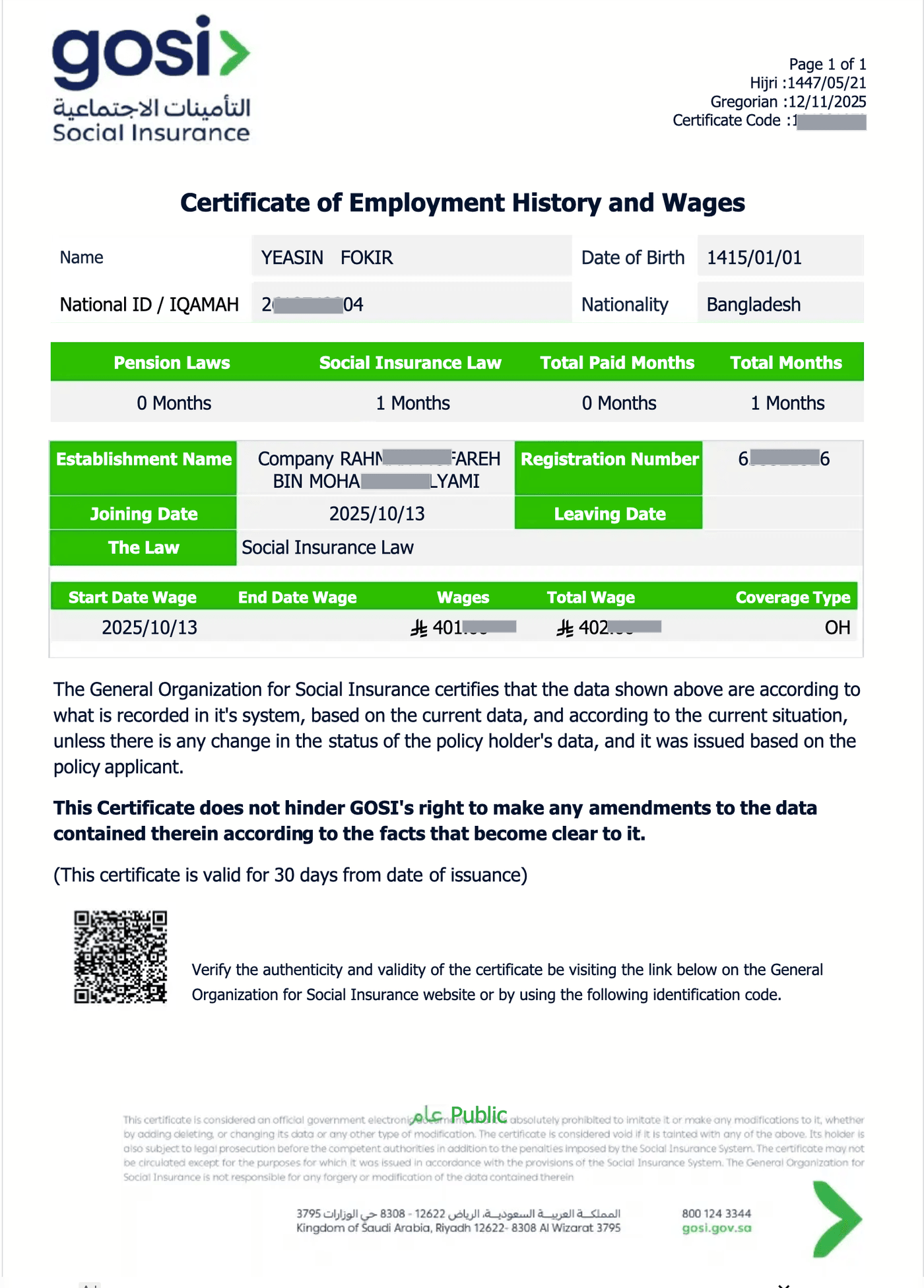
What’s Included in the Certificate?
Your GOSI salary certificate contains:
- Personal details (name, Iqama number, nationality)
- Complete employment history with dates
- Registered monthly salary for each job
- Employer information
- Social insurance contributions
The document is officially stamped and accepted for all formal purposes.
Quick Troubleshooting
Can’t log in?
Ensure your Nafath app is updated and fully registered.
Certificate not downloading?
Check your internet connection and phone storage space.
Missing employment records?
Contact your employer—they’re responsible for GOSI registration.
Final Thoughts
The GOSI mobile app makes getting your salary certificate incredibly simple. What used to require office visits now takes just a few taps on your phone.
Keep your Nafath app active and updated—it’s essential for accessing most Saudi government services digitally.
More in this guide
- How to Add Your Credit/Debit Card to Apple Pay — Saudi Arabia is one of the few countries that Apple Pay can be used in. In this blog, we explain how to add your bank card to Apple Pay
- Al Rajhi Bank Mada Card: How to Renew and Print at Kiosk — This article explains how to renew and print your Al Rahji Bank ATM card (mada card) through a self-service kiosk without visiting the branch
- Al Rajhi Bank Credit Cards 2023 — From rewards programs to flexible repayment..
- Saudi Post's Awfar Service: Everything You Need to Know — Awfar is a service provided by Saudi Post for consumers who want their products delivered to their preferred address
- Best 10 Residential Compounds in Riyadh — Learn about the top compounds in the city, their features and amenities
- Best Credit Cards for Expatriates in Saudi Arabia 2026: Complete Guide — Compare top cards, eligibility requirements, benefits, and how to apply as an expat