How to activate "Digital Iqama" in Absher?
Step by step guide on how to activate "Digital ID" or "Digital Iqama" through the "Absher Individuals" app.
Saudi Arabia’s Ministry of Interior has launched digital versions of national identity cards for citizens and expatriates. The “Digital ID” or “Digital Iqama” can be accessed through the new “Absher individuals” app.
Digital ID’s can be used instead of plastic cards for all official purposes.
How to Activate Digital Iqama in Absher?
1- Download the “Absher Individuals” app from the Play Store or App Store.
2- Log in using your Absher username and password.
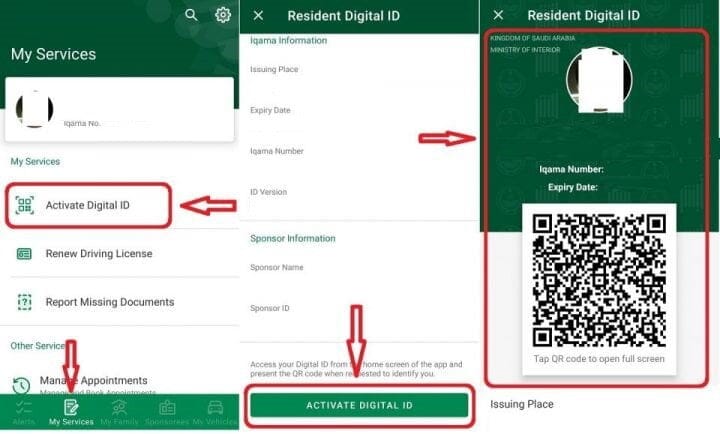
3- Click on “My Service”
4- Select “Activate Digital ID“
5- At the bottom of the next page, click on “Activate Digital ID” again and complete the activation.
You can also download your Digital Iqama on your phone to access it without internet.
More in this guide
- See the Updated List of Absher Machine Locations — The following is a complete list of Absher machine locations in KSA
- How to Book a Jawazat Appointment Online in Saudi Arabia — Step-by-step guide to scheduling your visit for passport services
- How to Change Absher Mobile Number Using Nafath App — Learn how to update or update your Absher mobile number easily with the Nafath app in this quick step by step guide
- Hajj 2026 Registration Open for Saudi Citizens & Residents — Packages open from 15 Ramadan
- 3 Ways to Update Your Mobile Number in Absher — Learn the latest ways to change your Absher mobile number using the Absher app, Nafath app, or an Absher Self-Service Kiosk in Saudi Arabia
- How to Easily Refund Unused Iqama Funds — Learn how to quickly refund your unused Iqama funds for absher services through ATM, internet, or mobile banking